Invoice Parsing at Scale with Agentic Document Extraction

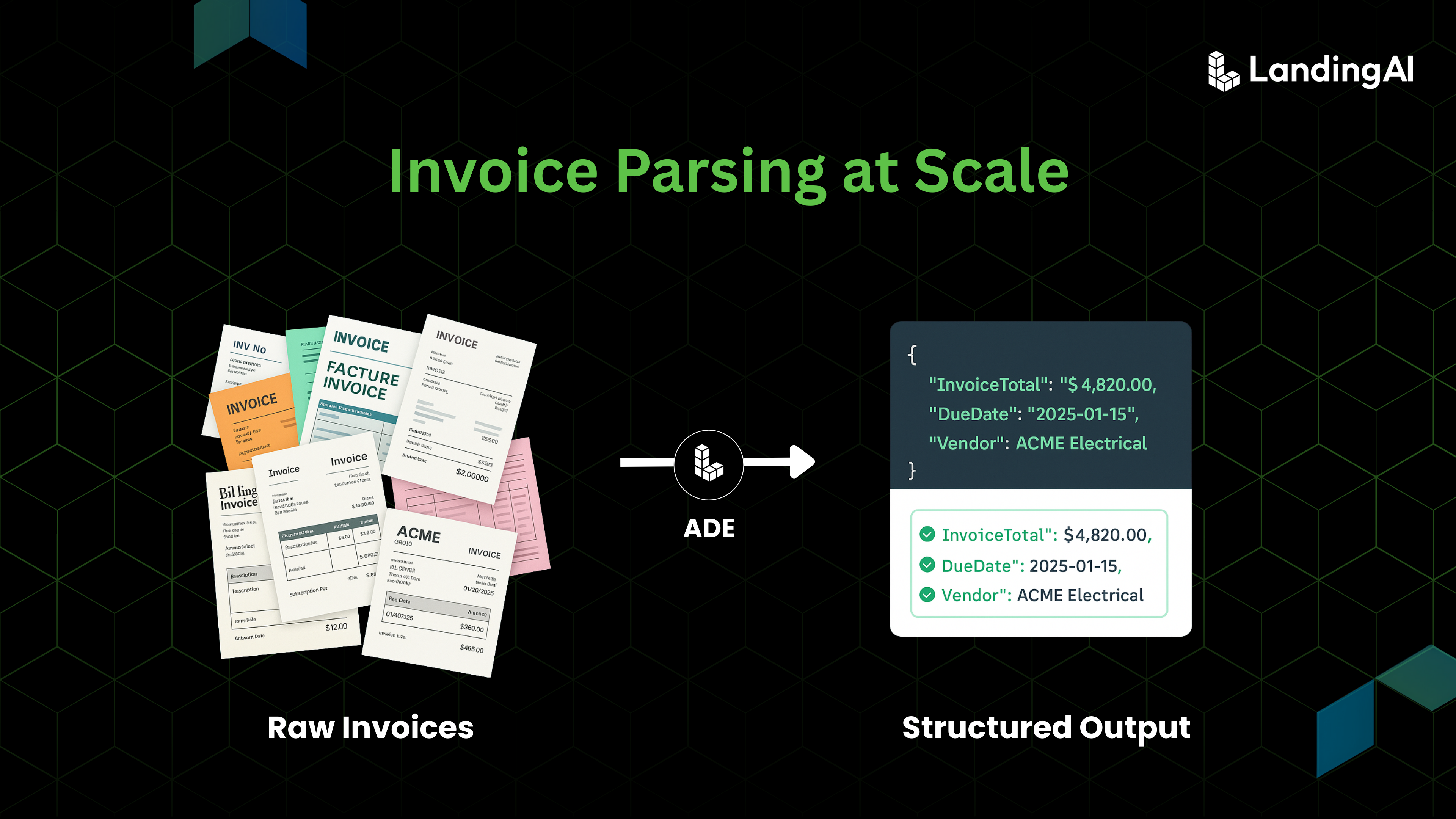
Invoices might look straightforward, with tables, numbers, and totals neatly listed, but anyone who has worked with real-world data knows how unpredictable they can be. Each vendor uses a different layout, set of labels, and design conventions. Some include multiple currencies, others span several pages, and many arrive as low-quality scans or flattened PDFs. At scale, even small inconsistencies add up. Studies have shown that manual invoice processing can take anywhere from 5 to 10 minutes per document, depending on complexity. Across thousands of invoices per month, this quickly becomes a significant operational burden. Traditional OCR and template-based systems can read text, but they often fail to understand context, leading to misplaced fields, broken structures, and long manual review cycles.
Agentic Document Extraction (ADE) from LandingAI brings reliability to invoice processing by focusing on structure and context rather than fixed templates. ADE interprets invoices visually, understanding how different elements relate to each other on the page. It identifies vendor details, dates, totals, and line-item tables while grounding every extracted value to its original location, enabling traceability and confident validation. This matters because even small extraction errors can trigger downstream rework, approvals, or payment delays. Industry surveys show that over 40% of organizations cite invoice errors and processing delays as a direct contributor to inefficiency and cash flow issues in accounts payable operations
In this post, we explore how ADE handles a range of invoices and how its layout-aware approach generalizes across increasing levels of complexity. These are the actual invoices parsed into structured data below:
A subscription invoice with clearly defined sections and simple totals
A contractor invoice with a sparse design and minimal structure
A service invoice containing loosely formatted tables and long text descriptions
An international invoice featuring bilingual headers, multiple currencies, and complex line-item tables
The Reality of Invoice Data Extraction
Invoices are at the core of financial workflows, yet they remain one of the hardest document types to automate. Each one contains structured data such as vendor names, invoice numbers, dates, line items, taxes, and totals, but these fields rarely follow a consistent format. Invoices arrive as PDFs, scanned copies, or email attachments, each with its own layout and structure. What should be a standardized process often turns into manual correction and template maintenance.
The challenges stem from how differently invoices are designed and presented across vendors and formats. Below are some of the key factors that make invoice extraction so difficult:
Layout variability**
** Every vendor uses a different design. One might place “Invoice Number” in the top right, another beside the vendor address. Field positions, fonts, and alignments differ across suppliers and even across versions from the same one. A small layout change can break a template-based pipeline.
Line-item tables**
** Tables vary in structure, column headers, and length. Some include clear gridlines; others rely on spacing. Some extend across multiple pages, while others merge text within a single row. Traditional OCR struggles to determine which amount belongs to which description or quantity.
Poor quality scans and noise**
** Invoices are often scanned at odd angles or poor resolution. Shadows, folds, and low contrast distort characters, making it difficult for both OCR and humans to read accurately.
Currency and tax variations**
** Invoices include different currencies like USD, EUR, or ₹ and use regional tax formats such as GST, VAT, or service charge. Some list taxes as inclusive, others exclusive. Extracting the right total requires context beyond text recognition.
Ambiguous key–value pairs**
** Labels are inconsistent. “Invoice No.,” “Invoice #,” “Inv ID,” and “Bill ID” can all mean the same thing. “Date of Issue” might appear instead of “Invoice Date.” Even the word “Total” can refer to a subtotal, a line-item total, or the final payable amount depending on placement.
Traditional OCR and template-based systems struggle because they capture text but fail to understand layout, context, and relationships between fields. ADE takes a data-centric approach, trained on carefully curated, domain-specific invoice datasets that reflect the variability seen in real financial workflows. This focused training allows it to recognize how fields relate to each other across formats, how line-item structures behave, and how totals, taxes, and currencies connect within different layouts. By grounding every prediction, ADE ensures extraction that is consistent, schema-aligned, and ready for production-scale automation.
ADE in Action
Example 1: Subscription Invoice
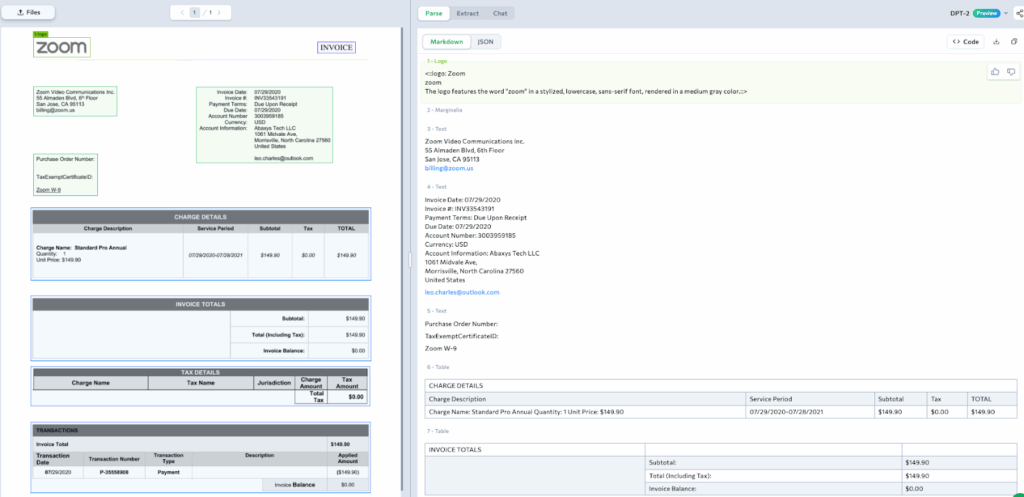
This invoice represents one of the most common formats in business workflows — a digital subscription receipt from a software provider. Although it looks straightforward, it contains a mix of structured and unstructured sections: vendor details, billing addresses, charge summaries, and transaction records scattered across the page.
ADE works in two key stages to turn complex documents into structured data: Parse and Extract. We can see both in action using this example.
Parse
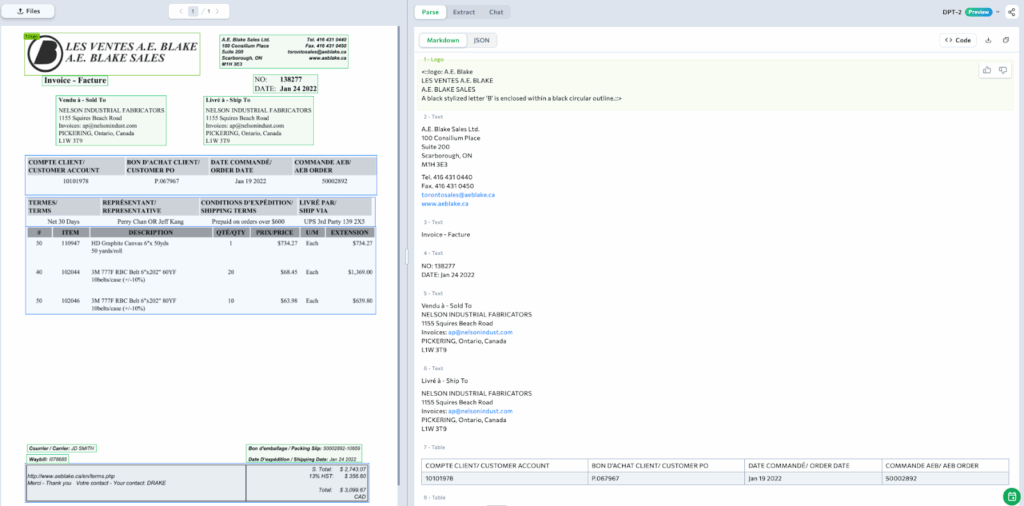
Let’s Parse this invoice to see how ADE structures it. ADE reads the full page, identifying key elements like the company logo, header details, and tables. It distinguishes the vendor and customer information, the charge details, and the invoice totals and transaction summary. Text, tables, and numeric fields are all captured in order, preserving the layout exactly as it appears in the document. Every parsed element remains visually grounded.
Extract
If you want to extract key fields from this invoice for your downstream processing, you can do that with Extract. In this example, we’re pulling out DueDate, AccountNumber, ServicePeriod, and InvoiceTotal, but you can define any fields you need for your workflow.
When the extraction runs, ADE automatically populates the schema with the correct values and each extracted field is visually grounded, ensuring full traceability.
DueDate: 07/29/2020
AccountNumber: 3003959185
ServicePeriod: 07/29/2020 – 07/28/2021
InvoiceTotal: $149.90
This example demonstrates how ADE can Parse and Extract a clean commercial invoice end-to-end, interpreting structure, capturing relationships, and producing a complete, schema-aligned JSON output.
Once you understand how parsing and extraction work, you can try ADE with your own invoices in the Playground. Upload a few examples, define what you want to extract, and see how ADE adapts to different layouts and formats.
Now, let’s explore more invoice examples.
Example 2: Contractor Invoice (Roofing Renovations)
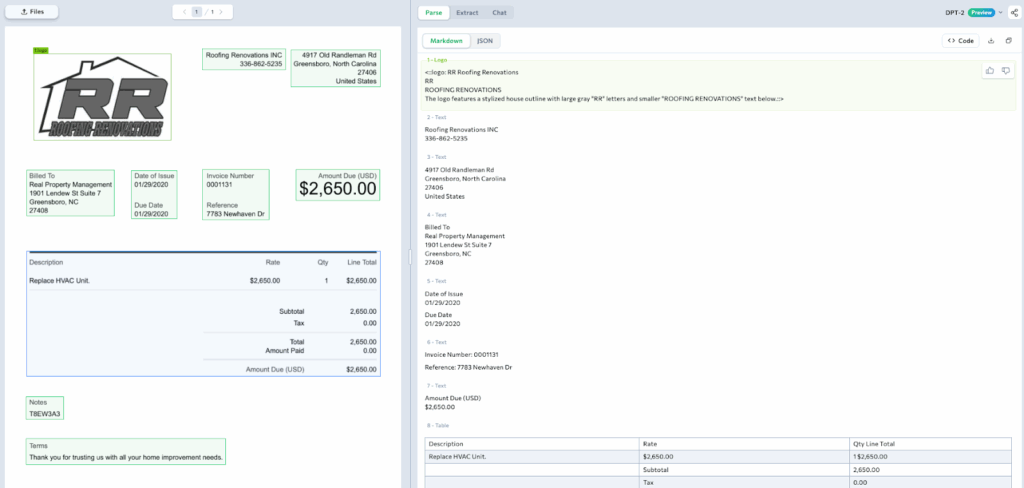
This contractor invoice captures a real-world service transaction between Roofing Renovations Inc. and Real Property Management. It represents a typical semi-structured business document where traditional OCR tools often struggle because of inconsistent layouts and faint or missing table grid lines.
In this example, ADE cleanly distinguishes between visual and textual components, identifying the company logo, vendor and client details, and invoice metadata such as Date of Issue, Due Date, Invoice Number, and Reference.
The layout understanding becomes most apparent in the table section. Even though the invoice lacks visible grid lines, ADE accurately interprets the structure of the line-item area under headers like Description, Rate, Qty, and Line Total. It correctly aligns the corresponding values — Replace HVAC Unit, $2,650.00, 1, and $2,650.00 — preserving context across the row.
This ability to infer tabular relationships visually, without relying on templates or line boundaries, highlights ADE’s strength in spatial reasoning.
Example 3: Electrical Contractor Invoice (Custom Electric & Plumbing)
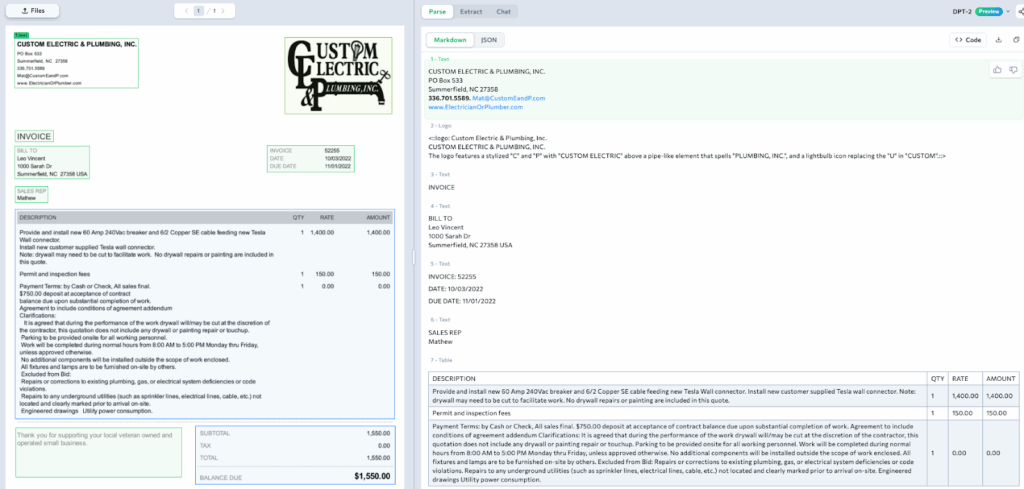
This contractor invoice blends structured billing data with lengthy, descriptive text — a format common in service-based industries. ADE interprets the document layout accurately, identifying key elements like the Custom Electric & Plumbing, Inc. logo, vendor details, billing information, and metadata fields such as Invoice Number, Date, Due Date, and Sales Rep.
What stands out here is ADE’s ability to handle complex text regions. In the Description section, it reads long technical details as cohesive paragraphs rather than fragmented lines. For instance, it correctly captures the entire statement: “Provide and install new 60 Amp 240Vac breaker and 6/2 Copper SE cable feeding new Tesla Wall connector,” while maintaining spacing, order, and context.
It also aligns line items such as Permit and inspection fees with their corresponding Qty (1), Rate (150.00), and Amount (150.00) values, preserving the table’s internal structure despite irregular formatting.
This example highlights how ADE maintains readability and structure even when invoices combine freeform descriptions with tabular financial data, ensuring that both narrative and numeric details remain accurately grounded within the document.
Example 4: International Multi-Language Invoice (A.E. Blake Sales)
This bilingual invoice from A.E. Blake Sales Ltd. demonstrates how ADE parses documents that combine multiple languages within the same structure. It accurately reads both French and English headers such as “Vendu à / Sold To” and “Date Commandé / Order Date”, treating them as paired representations of the same field. The system preserves the tabular layout across alternating languages, aligning each product description, quantity, and price with its correct header and total. Even with two languages sharing the same page, ADE keeps the logical relationships intact, producing a clean, structured representation.
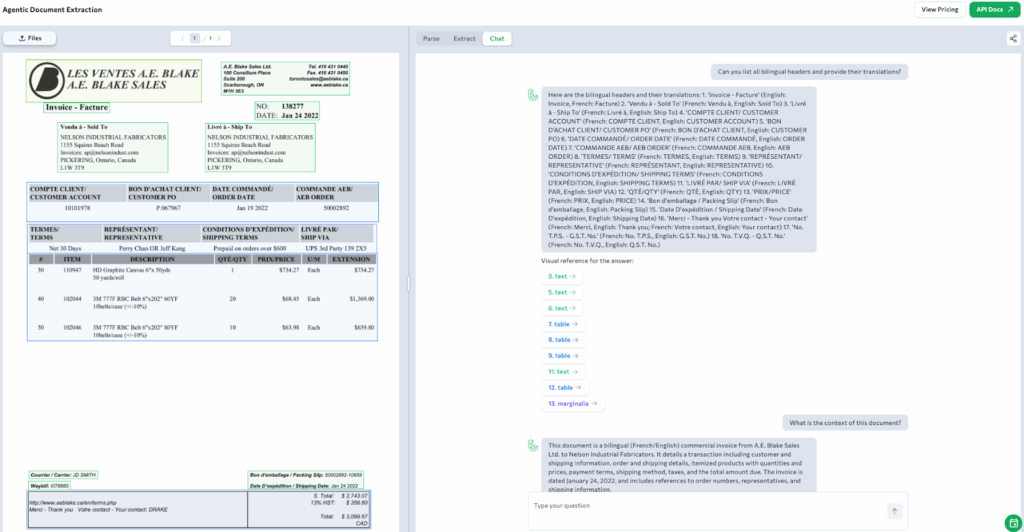
In ADE Playground, there is also a chat interface that makes the same parsed document even more interactive. Here, we’ve used it to ask questions directly about the bilingual fields. ADE responds with precise translations such as “Compte Client → Customer Account” and “Conditions d’Expédition → Shipping Terms.”
Beyond translations, the chat can also extract specific fields on request — for example, pulling the Invoice Date (January 24, 2022) or Total Amount (3,520.00 CAD) directly from the structured output. Each response is grounded to its visual source, ensuring the answers remain verifiable.
Finally, you can see when we asked for a summary, ADE simply composed a short contextual description of the transaction, highlighting key details like products, quantities, and totals. This illustrates how ADE makes even multilingual and foreign-language invoices immediately accessible and understandable.
Conclusion
From invoices that look simple on the surface to those filled with complex tables, varied formats, and multiple languages, document structures differ in every possible way. ADE understands this variability and brings a unified approach to reading, interpreting, and organizing them with accuracy and context.
By combining visual understanding with layout-aware reasoning, ADE transforms invoice parsing into a process that is reliable, transparent, and easy to scale. It reads invoices the way people do, keeping every field tied to its original source, and turning each document into structured data.
Ready to get started?
Test ADE live in the Visual Playground