
The Problem with Trusting Document AI Blindly
When you build a document processing pipeline, you’re making an implicit bet: that when the model reads an invoice, a contract, or a financial statement, it gets the right answer. Most of the time, it does. But “most of the time” is exactly where the problem lives.
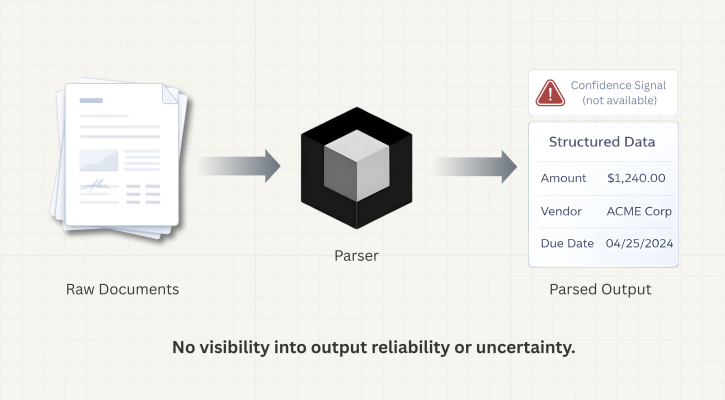
Document AI systems—even strong ones—fail silently. When a model encounters a degraded scan, messy handwriting, or ambiguous text, it doesn’t pause and signal uncertainty. It returns an answer. That answer might be correct. It might not be. From the outside, both cases look identical.
This is the blind faith problem: your pipeline runs, your database fills, your downstream systems act on the data—and somewhere in that chain, a parsed value was wrong, and nothing told you.
Why This Matters More Than It Seems
Compliance Teams Need Explainability, Not Just Correctness
In regulated industries—financial services, healthcare, insurance—the question isn’t only “is this right?” It’s “how do you know?” Regulators increasingly expect organizations to justify automated decisions. “The model returned this value” is not an explanation. But “the model returned this value with high confidence, and values below our threshold were flagged for human review” is the beginning of one.
Exception Routing Breaks Without Uncertainty Signals
Straight-through processing—automatically handling documents from ingestion to output without any human review—only works if you can reliably identify which documents shouldn’t be handled automatically. Without a signal telling you which output the model was uncertain about, you have two options: review everything (which defeats the purpose of automation) or review nothing (and accept the risk of silent errors).
A confidence signal gives you a third option—review exactly what needs review.
Confidence Scores in Agentic Document Extraction
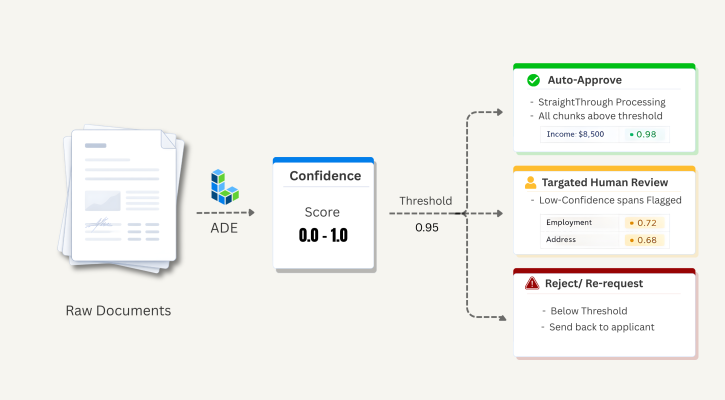
We recently added confidence scores to Agentic Document Extraction (ADE)—LandingAI’s document parsing API. Parsing results now include confidence scores for text, marginalia, card, and table chunks, as well as individual table cells.
A confidence score is a value between 0.0 and 1.0. Higher values mean the model was more certain about what it identified in that region of the document. Lower values mean it was less certain.
A few important things to understand about how to interpret scores:
- It is not a probability of correctness. A score of 0.80 doesn’t mean there’s an 80% chance the output is correct. It’s a relative signal: 0.80 is less certain than 0.95, which is less certain than 0.99.
- Use it as a ranking and triage signal. The practical question is: “Does this chunk clear my threshold?” not “Is this number mathematically precise?”
- We recommend 0.95 as a starting threshold. This is the threshold we use internally when evaluating parsing quality. Depending on your use case and risk tolerance, you may want to adjust it.
How It Works
In the Playground
The ADE Playground is a good starting point for understanding how confidence scores work with your document types—no code required. Use it to build familiarity with the feature before integrating it into a pipeline. After parsing a document, turn on the Confidence toggle.
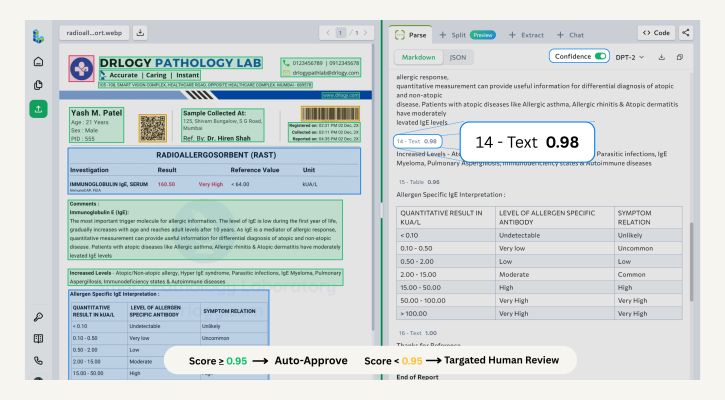 Screenshot of the ADE Playground with the Confidence toggle enabled
Low-confidence sections—those with scores of 0.95 or lower—are highlighted in yellow. The highlighting is precise:
- Text, card, and marginalia chunks : Individual spans within a chunk are highlighted. If a 200-word paragraph contains one uncertain phrase, you see exactly which phrase, not the entire paragraph.
- Tables : Each cell has its own confidence score. Low-confidence cells are highlighted individually.
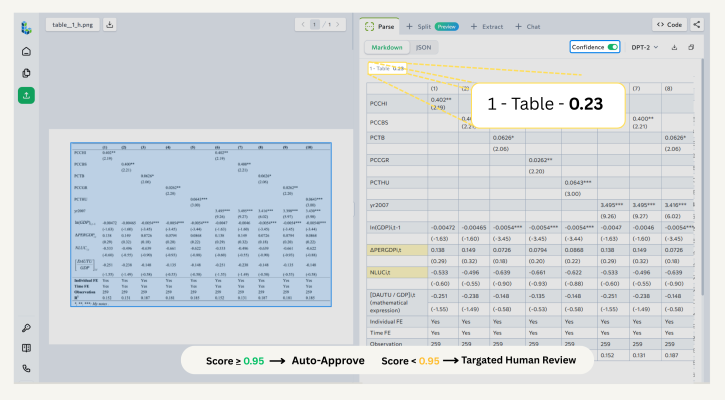 Screenshot of the ADE Playground with the Confidence toggle enabled
Screenshot of the ADE Playground with the Confidence toggle enabledScreenshot of the ADE Playground with the Confidence toggle enabledIn the API
When you use the ADE Parse API, confidence data is returned in the grounding object of the response. For supported chunk types, the grounding object includes:
- confidence: the overall score for that chunk (0.0–1.0)
- low_confidence_spans: an array of specific substrings within the chunk that scored 0.95 or lower, each with its character position and individual score
Here’s an example of what the response looks like for a text chunk with two low-confidence spans:
"grounding": {
"42ca60d3-a606-4c9a-a61e-493966b63fd9": {
"box": {
"left": 0.8607578277587891,
"top": 0.9346558451652527,
"right": 0.9316827058792114,
"bottom": 0.951895534992218
},
"page": 0,
"type": "chunkMarginalia",
"confidence": 0.991,
"low_confidence_spans": []
}
}
This structure gives you everything you need to build precise review workflows. Instead of flagging an entire document, you can surface the exact spans that need attention—and pass that information downstream in a structured format.
For the full field reference, see the confidence score documentation.
What This Enables
Confidence scores make it practical to build document processing pipelines that are genuinely production-ready:
- Targeted human review : Route only uncertain content to reviewers, with specific low-confidence spans identified. Reviewers spend their time on what matters, not on re-reading clean documents.
- Straight-through processing : Automatically pass documents through your pipeline without human review when all chunks clear your confidence threshold.
- Audit trails : Store confidence scores alongside parsed values. When a decision is questioned, you have a structured record of what the model was and wasn’t certain about.
- Pipeline monitoring : Track confidence score distributions over time. A sudden drop across a document type is an early indicator of a problem—a new template, a scan quality issue, a shift in document format—before errors accumulate downstream.
A Real-World Example: Loan Document Processing
Consider a lender processing residential mortgage applications. Each application includes a package of documents: pay stubs, bank statements, tax returns, and a signed loan agreement. The team processes hundreds of applications per day.
Before confidence scores, the workflow had two modes: auto-process everything (fast, but with silent error risk) or route everything to human review (safe, but slow and expensive). Neither was sustainable at scale.
With confidence scores integrated into their pipeline, the workflow looks like this:
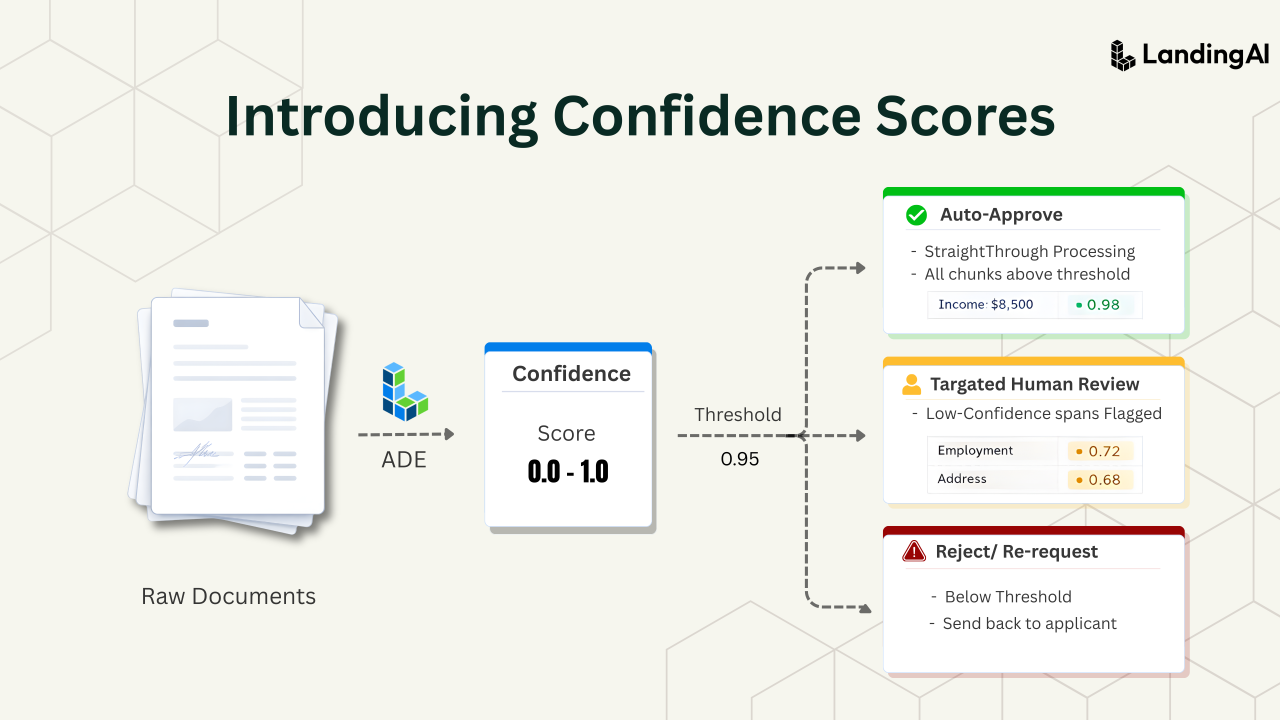
- ADE parses the full document package and returns confidence scores for supported chunk types—text blocks, tables, table cells, cards, and marginalia.
- The lender’s custom workflow checks each chunk’s confidence score against a threshold—in this case, 0.95.
- If all chunks clear the threshold, the application moves straight through to the next processing stage without human intervention.
- If any chunk falls below the threshold, the application is routed to a reviewer—but not for a full re-read. The reviewer sees only the flagged spans: a specific cell in an income table, an ambiguous figure on a bank statement, a name the model wasn’t certain about.
- The reviewer confirms or corrects those values, and the application continues.
The result: the team auto-processes the majority of applications, while reviewers focus their time on the specific content that genuinely needs a second look. Confidence scores are logged alongside parsed values, giving the compliance team a structured record to reference when needed.
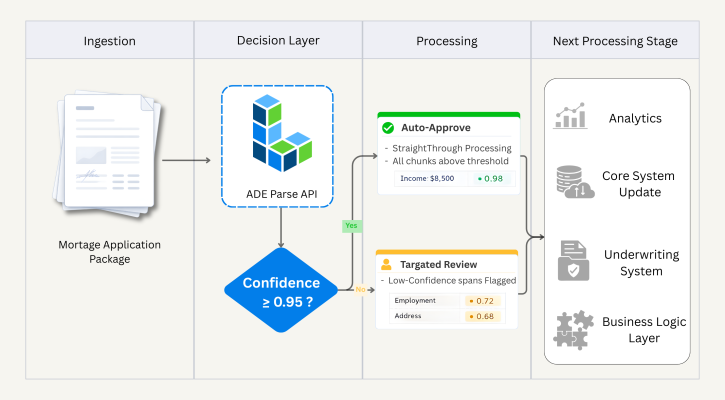 Example workflow using confidence score
Try It Yourself
The best way to understand how confidence scores apply to your documents is to test with your own data.
Start in the Playground : Upload a sample document in our Playground, enable the Confidence toggle, and see the confidence scores. No code required, and the results are returned in seconds.
Integrate via API : Once you understand how parsing works, use the ADE Parse API to bring confidence scores into your pipeline. The grounding object gives you everything you need to build custom routing and review logic. See the confidence score documentation for the complete field reference.