
Enterprise documents are long
Most extraction tools work great on short documents, say a 2-5-page invoice. But the reality is that enterprise documents are very long.
Take a 150-page Evidence of Coverage (EOC) — the document an insurer produces to describe every benefit, exclusion, copay, and cost-sharing rule for a health plan. When parsed into Markdown, the file produces roughly 20,000 lines of text. Extraction is trying to find one specific value from this vast sea of information: the annual in-network out-of-pocket maximum for an individual on a high-deductible plan. That's a needle in a haystack.
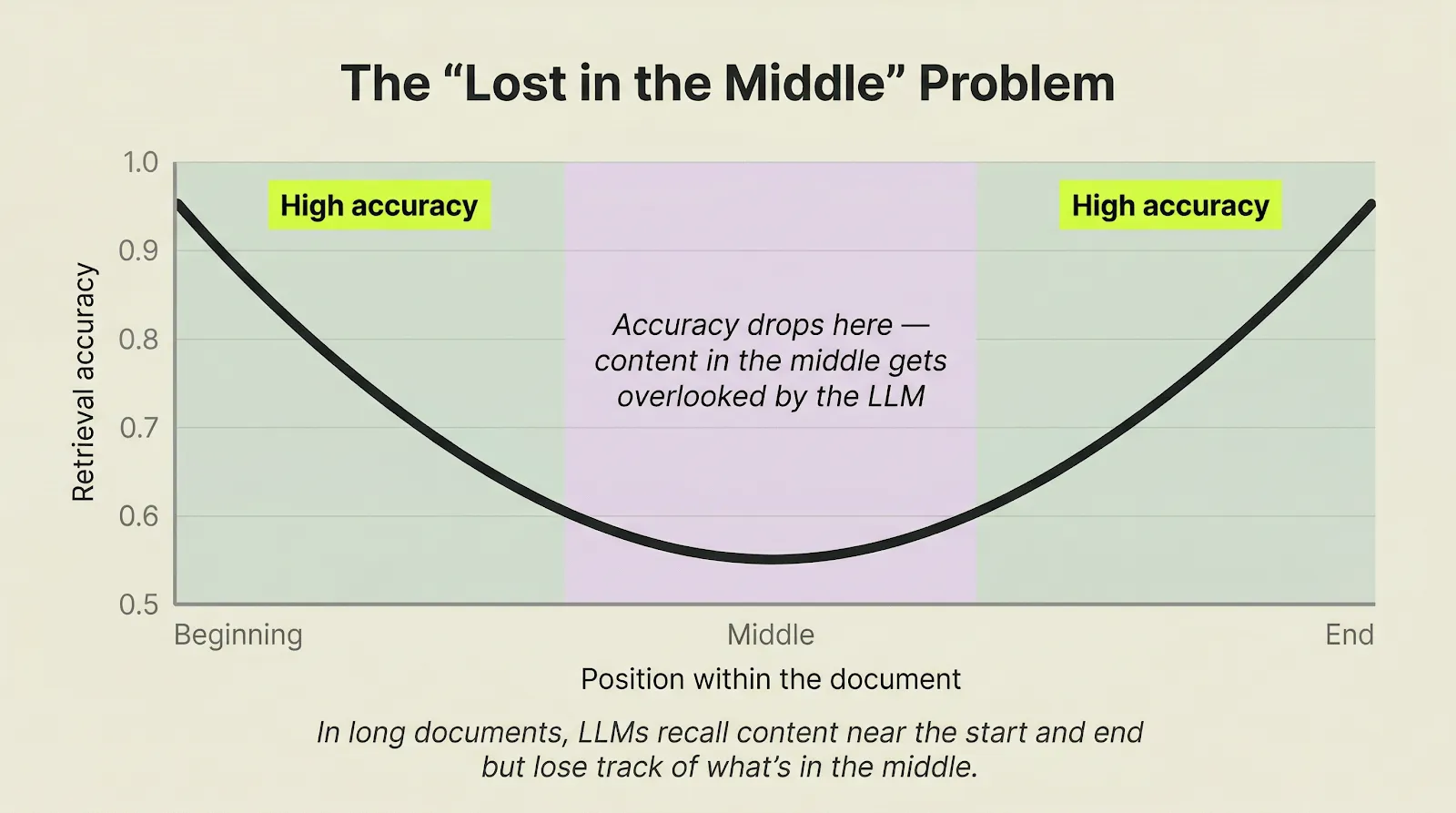
LLMs lose accuracy in the middle of long documents
The natural instinct is to send the entire EOC to a long-context LLM model call. But this is exactly where retrieval quality degrades.
In a 150-page EOC, that accuracy drop-off covers roughly pages 15 through 135. That's where most of the data lives.
The result: missing fields, invented values, or lazy placeholders like "same as above."
How the ADE Extract API handles long documents: divide and conquer
Think about how a human would actually read a 150-page reference document. If someone is looking for something specific, they don't read front to back in one pass like LLMs do. Instead, they scan the table of contents, jump to the right section, find the table, read the column headers, and pull the value. ADE works the same way:
Step 1: Map the structure
ADE first reads the document like a table of contents — it identifies sections, headings, tables, figures and how content is organized — so it knows where to look for each piece of data.
Step 2: Break down the task
Each extraction becomes a focused sub-problem scoped to a specific section. Instead of asking "find the out-of-pocket max somewhere in 150 pages," ADE knows to look in the cost-sharing section on pages 81–120.
Step 3: Extract in parallel
Each section is then processed independently with its full context intact.
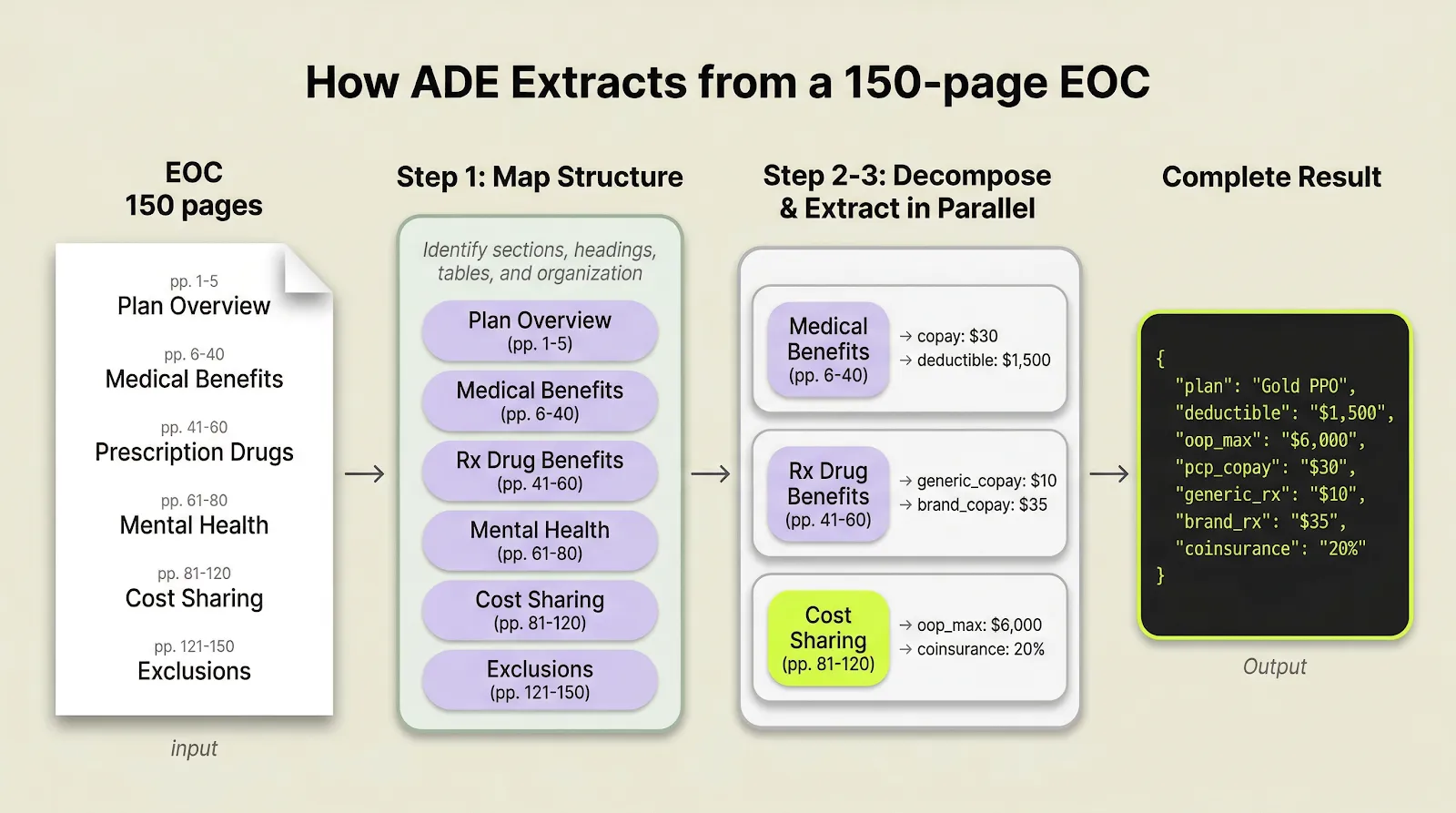
The workflow maps structure, decomposes extraction into section-level tasks, and merges the results into one output.
Decomposition is not fixed-size chunking. It follows semantic structure. A benefits section stays together. A multi-page table stays together. The extraction step happens with full document context preserved.
Extraction accuracy sets the ceiling for everything downstream
If extraction gets a field wrong, say, pulling the wrong copay amount from an EOC, that error flows into every downstream system that uses the data: the benefits comparison tool shows wrong numbers, the compliance report flags false issues, the claims system routes to the wrong team. One bad extraction becomes ten downstream problems.
How to test long-document extraction
Long-document extraction is not a side case. It is where many production pipelines either hold up or fall apart.
Start with the longest EOC that your team currently has to split manually into smaller files. Afterward, evaluate the output to ensure the extracted data is mapped into the correct fields and matches the original source values.
- Try Extract: Upload the hardest, longest document you currently split manually and run extraction in the Playground.
- API Documentation: Full extraction documentation.