Building Invoice-to-Contract Compliance with LandingAI ADE

TL;DR
DocuFlow extracts structured fields from invoice and contract PDFs with LandingAI ADE, indexes contract clauses in pgvector, and runs a deterministic rule engine that flags pricing violations before payment. On 500 invoice–contract pairs it hit 94% detection at a 4.2% false-positive rate, in under 45 seconds per pair — work that placed 2nd at the AWS Financial AI Hack 2025.
This is a builder's guide from Skywalkers77, the team that placed 2nd at the AWS Financial AI Hack 2025. Here's how we built DocuFlow — a pipeline that catches pricing violations before payment goes out.
What you'll build
This guide walks through how we built DocuFlow: an end-to-end pipeline that pulls structured data from invoice and contract PDFs using LandingAI ADE, indexes contract clauses with pgvector, and runs a deterministic compliance engine that flags pricing violations before payment goes out.
By the end you'll have a working blueprint for ingesting arbitrary PDF invoices and contracts through ADE Parse → ADE Extract; indexing clause embeddings with Gemini + pgvector; running a rule-based compliance engine with traced violations; and surfacing results through a role-based dashboard with an AI chat layer. The full pipeline runs in under 45 seconds per document pair.
Why use LandingAI ADE for finance PDFs?
Because finance PDFs are hostile territory for standard parsers, and ADE reads structure semantically instead of by template. Invoices arrive in dozens of layouts — multi-column tables, merged cells, handwritten notes, scanned images, inconsistent field labels. Contracts hide nested clause hierarchies, cross-references, and pricing schedules on page 30. The same ADE model handled a scanned small-vendor invoice and a 40-page enterprise contract in our pipeline with zero per-document configuration.
Template-based OCR breaks on layout variation. Rule-based parsers need per-vendor configuration and constant maintenance. LandingAI ADE takes a different path: it understands document structure semantically, not through pattern matching. That single property is what let us point one pipeline at 50 vendors without writing 50 parsers.
Architecture overview
DocuFlow is three independent layers. Each has one job and a clean interface to the next — which is what kept the system debuggable under hackathon time pressure.
| Layer | Components | Role |
| 1 · Extraction | FastAPI + LandingAI ADE (Parse → Extract) | Turns raw PDFs into structured JSON. |
| 2 · Intelligence | pgvector + Gemini RAG + rule engine | Indexes clauses, retrieves, compares, flags. |
| 3 · Presentation | React/TypeScript + Gemini 2.5 Pro | Role-based views + AI chat anchored to documents. |
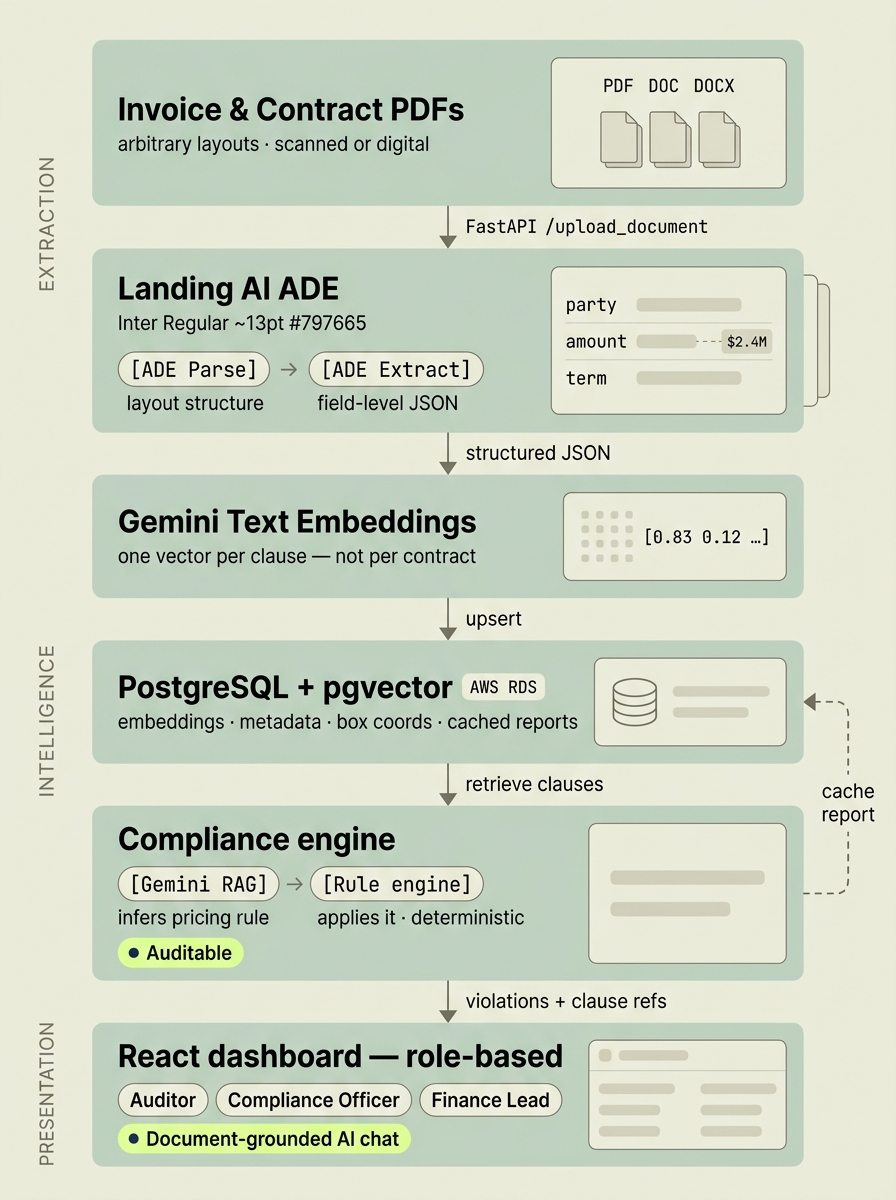
DocuFlow's three-layer data flow — extraction, intelligence, and presentation — anchored by a single Postgres + pgvector store that also caches compliance reports.
| Component | Technology |
| Document extraction | LandingAI ADE (Parse + Extract) |
| Embeddings | Google Gemini Text Embedding 004 |
| Vector store | AWS RDS PostgreSQL + pgvector extension |
| Backend API | FastAPI (Python) |
| Frontend | React + TypeScript + Vite + Tailwind |
| AI chat | Gemini 2.5 Pro (RAG-grounded) |
| Deployment | Static Vite bundle → Cloudflare Pages / Vercel / S3+CloudFront |
Step 1: How does document ingestion with ADE work?
A single FastAPI endpoint handles both document types. The document_type field routes each PDF to the correct ADE extraction schema, so invoices and contracts share one upload path but diverge into the right field set.**
# FastAPI upload endpoint@app.post("/upload_document")async def upload_document(file: UploadFile,document_type: str # "invoice" | "contract"):contents = await file.read()# Route to ADE pipeline on its own threadif document_type == "invoice":result = await run_in_threadpool(extract_invoice, contents)else:result = await run_in_threadpool(extract_contract, contents)await store_and_embed(result, document_type)return {"status": "processing", "id": result["id"]}
ADE Parse: layout understanding
ADE Parse is the first stage. It takes raw PDF bytes and identifies the document's structure: tables (including merged cells and multi-column layouts), heading hierarchies, paragraph blocks, and the spatial relationships between them. For a contract it maps which blocks are clauses, which are schedules, and which are headers. For an invoice it finds the line-item table, the header fields, and the totals block. You never tell it the document type or where fields live — Parse infers that from layout. That's what let one pipeline serve 50 vendors with no per-vendor config.
ADE Extract: structured field output
ADE Extract takes the parsed structure and returns the specific fields you've configured. Here's what DocuFlow pulls from an invoice and uses downstream:
{"invoice_id": "INV-00845","seller_name": "Acme Supplies Ltd","tax_id": "GB123456789","invoice_date": "2026-02-14","due_date": "2026-03-14","subtotal_amount": 14800.00,"tax_amount": 2960.00,"total_amount": 17760.00,"line_items": [{ "line_id": "L-001", "description": "Cloud Hosting Services","quantity": 12, "unit_price": 1200.00, "line_total": 14400.00 },{ "line_id": "L-002", "description": "Support Tier 2","quantity": 2, "unit_price": 200.00, "line_total": 400.00 }]}
And the matching contract clause extraction — note the box_coordinates on each clause: {"contract_id": "CTR-2025-0042","vendor_name": "Acme Supplies Ltd","effective_date": "2025-01-01","expiry_date": "2026-12-31","clauses": [{ "clause_id": "C-004", "clause_type": "pricing","section_reference": "Section 4.2.A","text": "Cloud Hosting Services shall be billed at $1,000 per unit per month.","unit_price_cap": 1000.00,"box_coordinates": { "page": 4, "x": 72, "y": 340, "w": 468, "h": 28 } },{ "clause_id": "C-007", "clause_type": "discount","section_reference": "Section 5.1","text": "A 5% volume discount applies when monthly units exceed 10.","discount_threshold": 10, "discount_rate": 0.05,"box_coordinates": { "page": 5, "x": 72, "y": 110, "w": 468, "h": 28 } }]}
Step 2: Why index clauses in pgvector on Postgres?
Because keeping embeddings in the same Postgres instance as your structured metadata removes a whole moving part. There's no separate vector database to sync, and the compliance engine can join clause embeddings with contract metadata in a single query. AWS RDS supports pgvector natively on PostgreSQL 15+, so this adds zero infrastructure (pgvector; AWS RDS PostgreSQL extensions).
Generating embeddings
DocuFlow uses Google Gemini Text Embedding 004 for clause vectorisation. We embed each clause individually — not the full contract — so retrieval stays clause-level precise (Google AI — Embeddings).
**import google.generativeai as genaidef embed_clause(clause_text: str) -> list[float]:result = genai.embed_content(model="models/text-embedding-004",content=clause_text,task_type="retrieval_document")return result["embedding"]# Store each clause with its embedding and metadatadef store_clause(clause: dict, contract_id: str):embedding = embed_clause(clause["text"])db.execute("""INSERT INTO contract_clauses(contract_id, clause_id, section_ref, clause_type, text,unit_price_cap, discount_rate, discount_threshold,box_coordinates, embedding)VALUES (%s, %s, %s, %s, %s, %s, %s, %s, %s, %s)""", [contract_id, clause["clause_id"], clause["section_reference"],clause["clause_type"], clause["text"],clause.get("unit_price_cap"), clause.get("discount_rate"),clause.get("discount_threshold"),json.dumps(clause["box_coordinates"]), embedding])
Retrieval: two strategies
The engine picks between two retrieval strategies depending on the query:
| Query type | Strategy | Example |
| Structured field lookup | Direct SQL on metadata columns | Find pricing clauses for vendor X |
| Semantic / free-form | pgvector similarity search on embeddings | What are the payment terms for late delivery? |
**def retrieve_relevant_clauses(invoice_line: dict, contract_id: str):# Try structured lookup first (faster, more precise)if invoice_line.get("description"):clauses = db.execute("""SELECT * FROM contract_clausesWHERE contract_id = %s AND clause_type = 'pricing'ORDER BY embedding <=> %s::vectorLIMIT 3""", [contract_id, embed_clause(invoice_line["description"])])if clauses:return clauses# Fall back to semantic searchquery_embedding = embed_clause(str(invoice_line))return db.execute("""SELECT * FROM contract_clausesWHERE contract_id = %sORDER BY embedding <=> %s::vectorLIMIT 5""", [contract_id, query_embedding])
Performance
Store compliance reports back into Postgres after each run. When the same invoice–contract pair is queried again — say after a contract amendment — the engine returns the cached report instantly instead of re-running the full pipeline.
Step 3: How does the compliance engine flag violations?
With a two-part design that you should not merge: a model infers the rule, and a deterministic engine enforces it. That split is the difference between flags a finance team trusts and flags they ignore.
- Gemini RAG infers the pricing rule from the retrieved clause text. Given "Cloud Hosting Services shall be billed at $1,000 per unit per month" and an invoice line at $1,200/unit, it outputs a structured rule: { field: unit_price, cap: 1000.00, operator: ≤ }.
- Deterministic rule engine applies that rule to the invoice data. No model involved. if invoice_price > contract_price_cap: flag violation — explicit, traceable, audit-ready.
Keeping these separate means your violation logic is always auditable. A reviewer can read the rule that triggered a flag without inspecting a model's reasoning.
The violation response
Every violation carries the clause reference and its coordinates, so reviewers jump straight to the source:
{"invoice_id": "INV-00845","contract_id": "CTR-2025-0042","status": "processed","checked_at": "2026-02-15T09:12:33Z","violations": [{ "line_id": "L-001", "violation_type": "Price Cap Exceeded","expected_price": 1000.00, "actual_price": 1200.00,"difference": 200.00, "quantity": 12, "total_overcharge": 2400.00,"contract_clause_reference": "Section 4.2.A","clause_box_coordinates": { "page": 4, "x": 72, "y": 340 } },{ "line_id": "L-001", "violation_type": "Volume Discount Not Applied","expected_discount": 0.05, "actual_discount": 0.00,"quantity": 12, "threshold": 10, "missed_saving": 720.00,"contract_clause_reference": "Section 5.1","clause_box_coordinates": { "page": 5, "x": 72, "y": 110 } }],"total_overcharge": 3120.00,"line_item_source": "extracted"}
The three compliance endpoints
Design the API to match how teams actually trigger checks:
| Endpoint | Use case | Notes |
| POST /analyze_invoice/{id} | On-demand, single invoice | AP clerk triggers manually after upload |
| POST /analyze_invoices | Batch, specific list | Pass an array of invoice IDs; runs in parallel |
| POST /analyze_invoices_bulk | Scheduled sweep | Checks everything new/updated since last run; pair with cron or AWS EventBridge; accepts a limit param |
Instrument the bulk endpoint from day one. Wait until production to add scheduling and weeks of uninspected invoices pile up. Even a nightly cron on a small dataset catches problems before they age.
Step 4: Why does the dashboard need roles?
Because the same compliance data means different things to different people, and one generic dashboard forces everyone to filter noise. DocuFlow's RoleSelection component maps each user to a tailored view at login.
| Role | Primary view | Key signals |
| Auditor | Risk scores + exception heatmaps | High-confidence violations, unresolved flags by age |
| Compliance Officer | Policy violation reports + SLA breach flags | Violation-type breakdown, clause-level drill-down |
| Finance Lead | Dollar-impact totals + cost recovery | Total overcharge, missed discounts, recovered amounts |
This is a frontend concern, not a backend one. The API returns the same violation data for every role; the dashboard layer filters and surfaces it based on the role stored in session.
AI chat panel: grounded, not global
The AIChatPanel is anchored to a specific document row — not a global chatbot. When an analyst opens a contract or invoice, the chat context is scoped to that document's extracted content and compliance report. Gemini 2.5 Pro answers from the stored clause text, not from general knowledge.
# AI query endpoint — document-scoped RAG@app.post("/ai/query")async def ai_query(invoice_id: str, question: str):invoice = get_invoice(invoice_id)clauses = get_matched_clauses(invoice_id)compliance = get_compliance_report(invoice_id)context = build_context(invoice, clauses, compliance)response = gemini.generate_content(f"""You are a financial compliance assistant.Answer only from the provided document context.Context: {context}Question: {question}If the answer is not in the context, say so explicitly.""")return {"answer": response.text,"grounded_in": [c["clause_id"] for c in clauses]}
Step 5: Deployment
| Component | Target | Config |
| React frontend | Cloudflare Pages / Vercel / S3+CloudFront | VITE_API_BASE_URL per environment |
| FastAPI backend | AWS EC2 / ECS / Lambda (containerised) | Exposes /upload_document, /analyze_*, /ai/query, /health |
| PostgreSQL + pgvector | AWS RDS (pgvector on RDS 15+) | Stores embeddings, metadata, cached reports |
| ADE pipeline | Called from FastAPI thread pool | ADE endpoints via LandingAI API key |
| Gemini | FastAPI + frontend AI panel | GEMINI_API_KEY env var |
The frontend build is a static Vite bundle with no server-side rendering. Point VITE_API_BASE_URL at your FastAPI instance and deploy anywhere that serves static files.
Results
Measured on 500 invoice–contract pairs during the AWS Financial AI Hack 2025, DocuFlow detected 94% of seeded pricing violations at a 4.2% false-positive rate, end-to-end in under 45 seconds per pair.
| Metric | Value | Detail |
| Detection rate | 94% | at 85% confidence |
| False positives | 4.2% | tunable via threshold |
| End-to-end | <45s | extract → flag |
| Hackathon placing | 2nd | AWS Financial AI Hack 2025 |
Lessons learned
1. The confidence threshold is the most important tunable
Model accuracy isn't what decides whether reviewers trust the system — the confidence threshold is. At 80%, our false-positive rate hit 12% and reviewers started ignoring alerts. At 90%, real violations slipped through. 85% was the sweet spot for our dataset. Start higher than you think you need, then lower it gradually as the team calibrates.
2. Separate extraction from comparison
ADE handles the messy-to-structured conversion; the rule engine handles the comparison. Don't put pricing logic inside a prompt. Compliance flags need to be reproducible and explainable — a rule engine gives you that, a model's reasoning doesn't.
3. Store box coordinates with every clause
This feels like over-engineering until a reviewer asks, "where exactly does it say that in the contract?" Linking a flag directly to the clause's position in the source PDF is what turns a suspicious flag into a verified finding. Without it, every flag becomes a manual document search.
4. Cache compliance reports
Re-running the full ADE → embed → retrieve → compare pipeline on every query is slow and expensive. Store the report in Postgres after the first run and re-fetch it for later views. Only re-run when the invoice or its matched contract changes — a last_compliance_run timestamp on both tables makes that trivial.
5. Build the bulk endpoint before you need it
Our /analyze_invoices_bulk endpoint was the last thing we built, and it should have been the first. Continuous monitoring — not on-demand spot-checks — is what gives a compliance engine its value. Wire up a scheduler in week one, even if it only runs on 10 invoices. The habit of automated sweeps matters more than the volume.
6. Handle invoices with no line items
Some invoices carry only a subtotal and tax amount. ADE extracts exactly what's there, so the engine has to handle this case explicitly: synthesise a single line item from subtotal_amount and tax_amount, run the check at invoice level, and flag line_item_source: "inferred". Skip this and roughly 15% of invoices in a real portfolio silently bypass compliance.
Frequently asked questions
Why use LandingAI ADE instead of template-based OCR for finance PDFs?
Template-based OCR breaks on layout variation and rule-based parsers need per-vendor configuration. ADE understands document structure semantically, so one model handles a scanned small-vendor invoice and a 40-page enterprise contract with no per-document setup.
What's the difference between ADE Parse and ADE Extract?
ADE Parse handles layout understanding — tables, headers, multi-column regions, nested hierarchies. ADE Extract pulls the specific fields you configure and returns structured JSON. Parse maps the document; Extract reads the values.
Why keep embeddings in pgvector on Postgres instead of a separate vector database?
It lets the compliance engine join clause embeddings with contract metadata in one query, with no extra infrastructure to sync. AWS RDS supports pgvector natively on PostgreSQL 15+.
Why separate the RAG model from the rule engine?
Gemini RAG infers the pricing rule from clause text; a deterministic engine applies it with no model involved. Keeping them separate makes every violation reproducible and auditable instead of locked inside model reasoning.
What confidence threshold should an AI compliance engine use?
For DocuFlow, 85% was the sweet spot. At 80% false positives hit 12% and reviewers ignored alerts; at 90% real violations were missed. Start high and lower it as the team builds trust.
How do you handle invoices with no line items?
Synthesise one line item from subtotal_amount and tax_amount, run the check at invoice level, and flag line_item_source: "inferred". Otherwise about 15% of a real portfolio silently skips compliance.
Next steps
Explore the build
Skywalkers77 shipped the full working system. The source code is on GitHub, and you can watch the demo video to see the extraction and compliance flow end-to-end.
Talk to LandingAI
Scoping a treaty intake or contract-management workflow? You can email the LandingAI team to discuss applying the same extraction pattern to your documents.