Why PDF Search Fails — and How ColPali Fixes It



TL;DR
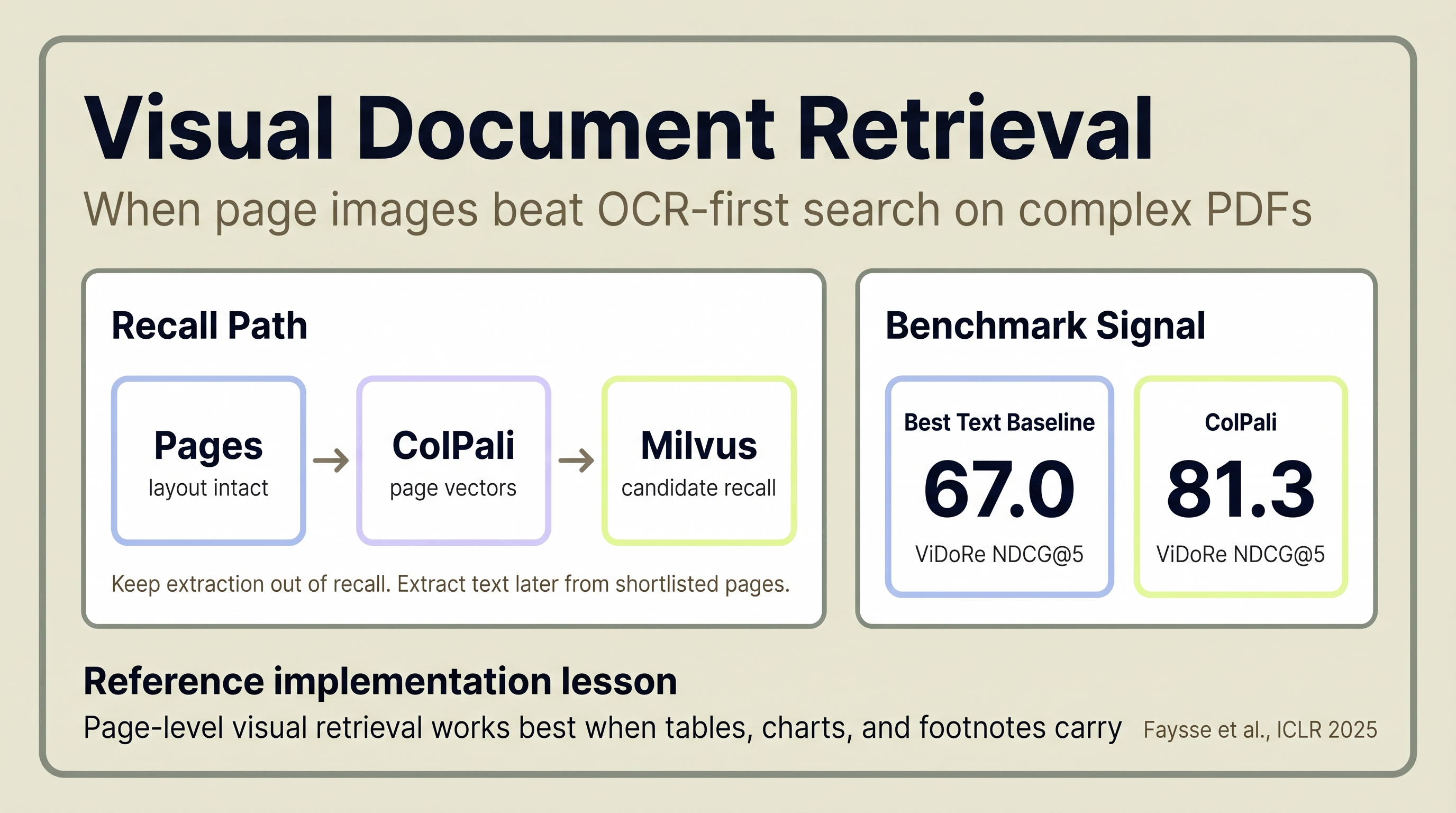
Visual document retrieval is the cleanest fix for PDF search systems that miss the exact pages enterprise teams care about most: tables, footnotes, charts, and multi-column disclosures. OCR can recover many of the words, but it often weakens the structure those words depend on.
ComplianceGuard, the open-source implementation by Tilak Sharma and Hrishikesh D Kakkad, uses ColPali to embed rendered page images, Milvus to store the page vectors, and MaxSim reranking to score whole-page relevance. On ViDoRe, ColPali reaches 81.3 NDCG@5 versus 67.0 for the strongest text baseline reported in the paper (Faysse et al., ICLR 2025).
In the ComplianceGuard repository, that pattern becomes a practical design rule: use visual retrieval for recall, run LandingAI ADE during ingestion to cache grounded text and chunks, then read only the cached chunks for the shortlisted pages when downstream analysis needs evidence. The lesson is not "never use OCR again." The lesson is "keep brittle extraction out of the recall path."
Key Takeaways
- ColPali scores 81.3 NDCG@5 on ViDoRe v1, versus 67.0 for the strongest text baseline (Faysse et al., ICLR 2025).
- Visual retrieval treats each page as an image, preserving table structure and footnote context that text extraction flattens away.
- Top-performing visual retrieval models in 2025 now exceed 90 NDCG@5 on ViDoRe v1, which is why a harder v2 benchmark was released.
- GPU-based visual embedding runs at 0.26 pages per second versus 8.47 for OCR (NVIDIA, 2025), so vision-heavy ingestion costs more and benefits from async batching.
- In ComplianceGuard, visual retrieval handles recall and LandingAI ADE caches document chunks separately, so downstream analysis reads page-grounded text only after retrieval has narrowed the candidate set.
Why Treat PDF Pages as Pages, Not Text Strings?
The core mistake in many PDF search systems is treating documents as text first and pages second. That works on simple prose. It breaks when meaning depends on layout, tables, charts, and footnotes.
The standard approach to PDF search has been the same for over a decade. Extract text with OCR or a parser. Split it into chunks. Generate embeddings. Store them in a vector database. Search.
This pipeline assumes the hard part is reading the words. On many enterprise documents, the harder part is preserving the relationships between the words: which number belongs to which row, what a legend refers to, and how a footnote connects to the disclosure it qualifies. Financial statements have nested tables. Engineering specs have diagrams. Regulatory filings mix prose with structured disclosures across multi-column layouts.
Vision-language models changed the equation. Instead of extracting text from a page, they look at the page. The model sees the table as a table, the chart as a chart, and the footnote in its spatial context. ColPali, published at ICLR 2025, showed this approach outperforming strong text extraction pipelines on visually rich retrieval benchmarks.
ComplianceGuard came out of the Financial AI Hackathon Championship 2025, built by Tilak Sharma and Hrishikesh D Kakkad with SEC compliance review as the target use case. The pain point that drove the design showed up immediately: once the evidence lived inside nested tables, footnotes, and dense disclosures, the usual OCR-first stack kept returning the right words from the wrong place. This article is best read as a practical note from that build. The reusable lesson is not that every document system should look identical. It is that page-level visual retrieval is often the better recall layer when layout carries meaning.
Why Does Traditional PDF Search Fail on Real Documents?
Traditional PDF search fails when the answer depends on structure, not just words. OCR can recover text, but retrieval still loses accuracy if the system flattens tables, chart labels, and cross-page references into plain text.
In the ColPali paper, even the strongest text-centric baselines trail the visual approach on ViDoRe, which is a sign that end-to-end structure loss matters on these tasks (Faysse et al., ICLR 2025).
Consider a financial disclosure table. Three columns, nested sub-rows, footnote markers referencing text two pages later. A text extraction pipeline converts this into a flat string. The column relationships disappear. The footnote references break. A search query asking "what was the Q3 revenue adjustment?" returns the right words but from the wrong row.
Charts are worse. A pie chart showing risk allocation by category may yield little or no usable text from OCR alone. The information can effectively vanish from a text-only search index.
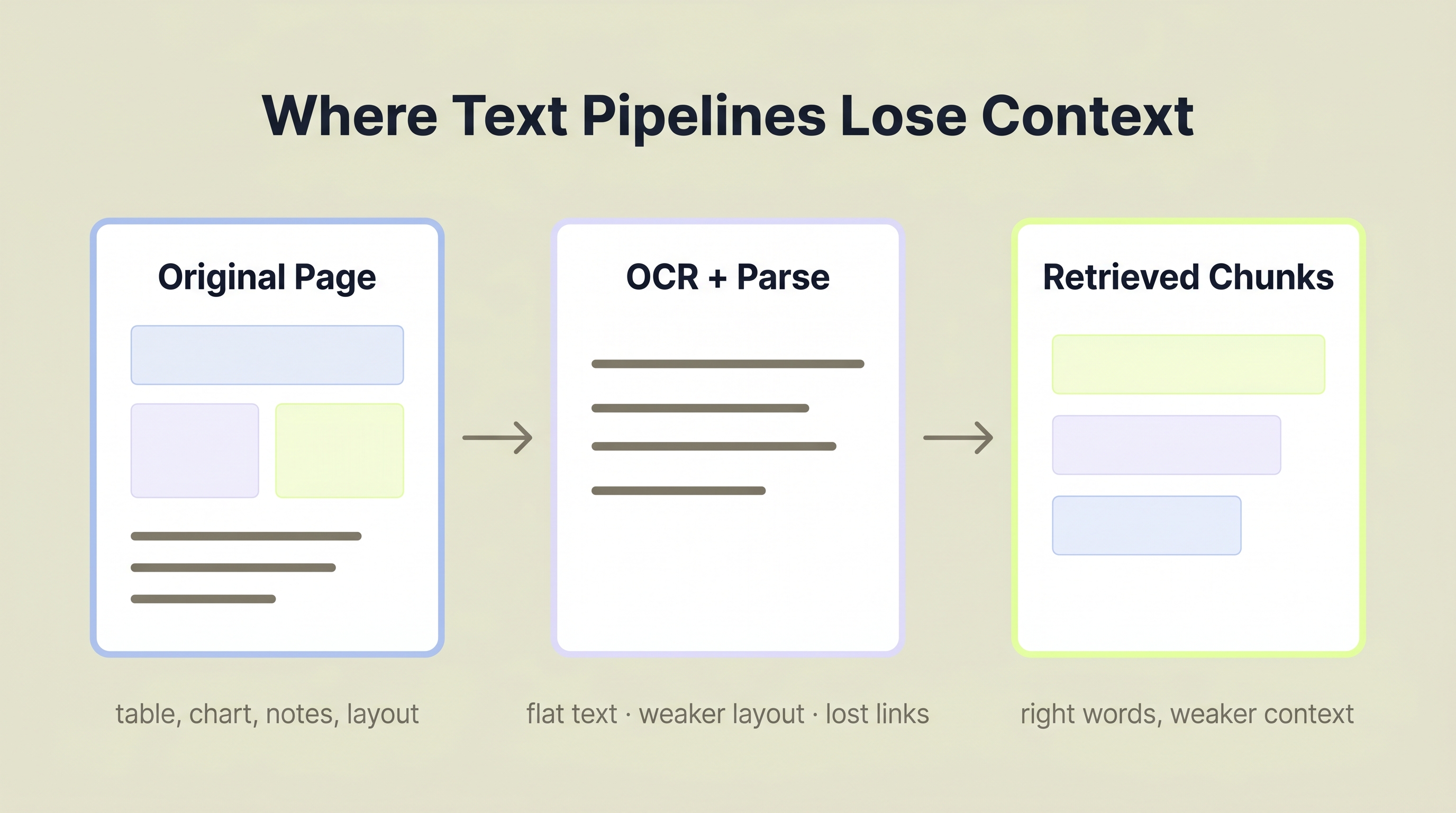
Complex pages often lose retrieval signal when layout and visual structure are flattened into text chunks.
If the retrieval target lives in a table cell, chart annotation, or footnote marker, partial extraction is enough to miss the right page entirely.
What Is Visual Document Retrieval?
Visual document retrieval treats each page as an image and retrieves whole pages by visual relevance, bypassing OCR entirely. On visually rich benchmarks, that shift improves recall by a wide margin.
ColPali, published at ICLR 2025 by Faysse et al., achieves 81.3 NDCG@5 on the ViDoRe benchmark. The strongest text extraction baseline reported in the paper (Unstructured + captioning with BGE-M3 embeddings) scores 67.0 on the same benchmark (arXiv:2407.01449). That is a 21% relative improvement on a benchmark built for visually rich page retrieval.
The approach is straightforward. Take a PDF page. Render it as an image. Pass that image through a vision-language model (PaliGemma-3B in ColPali's case). The model produces ColBERT-style multi-vector embeddings, one set of 128-dimensional vectors per page. No OCR step. No layout detection. No text chunking.
Search works through late interaction (also called MaxSim scoring). Late interaction means each query token vector is matched against every page token vector, and the maximum similarity scores are summed across all query tokens. Pages rank by that total similarity score. The result is page-level retrieval that understands both the text and the visual structure.
Why does this work? Because the model sees the page the way a human does. A table is a grid of aligned values. A chart is a visual pattern. A footnote is spatially connected to its reference. None of this survives text extraction cleanly, but all of it survives image encoding.
That doesn't make OCR obsolete. It means that for visually rich retrieval, directly embedding the page preserves signals OCR pipelines often have to reconstruct heuristically. In other words, visual retrieval is not an anti-text position. It changes the order of operations. Rank pages visually first, then run text extraction only on the small set of pages a workflow actually needs.
Top-performing visual retrieval models in 2025 now surpass 90 NDCG@5 on ViDoRe v1 (Hugging Face ViDoRe team, 2025), which prompted the creation of ViDoRe v2 with harder evaluation tasks. The field is moving fast.
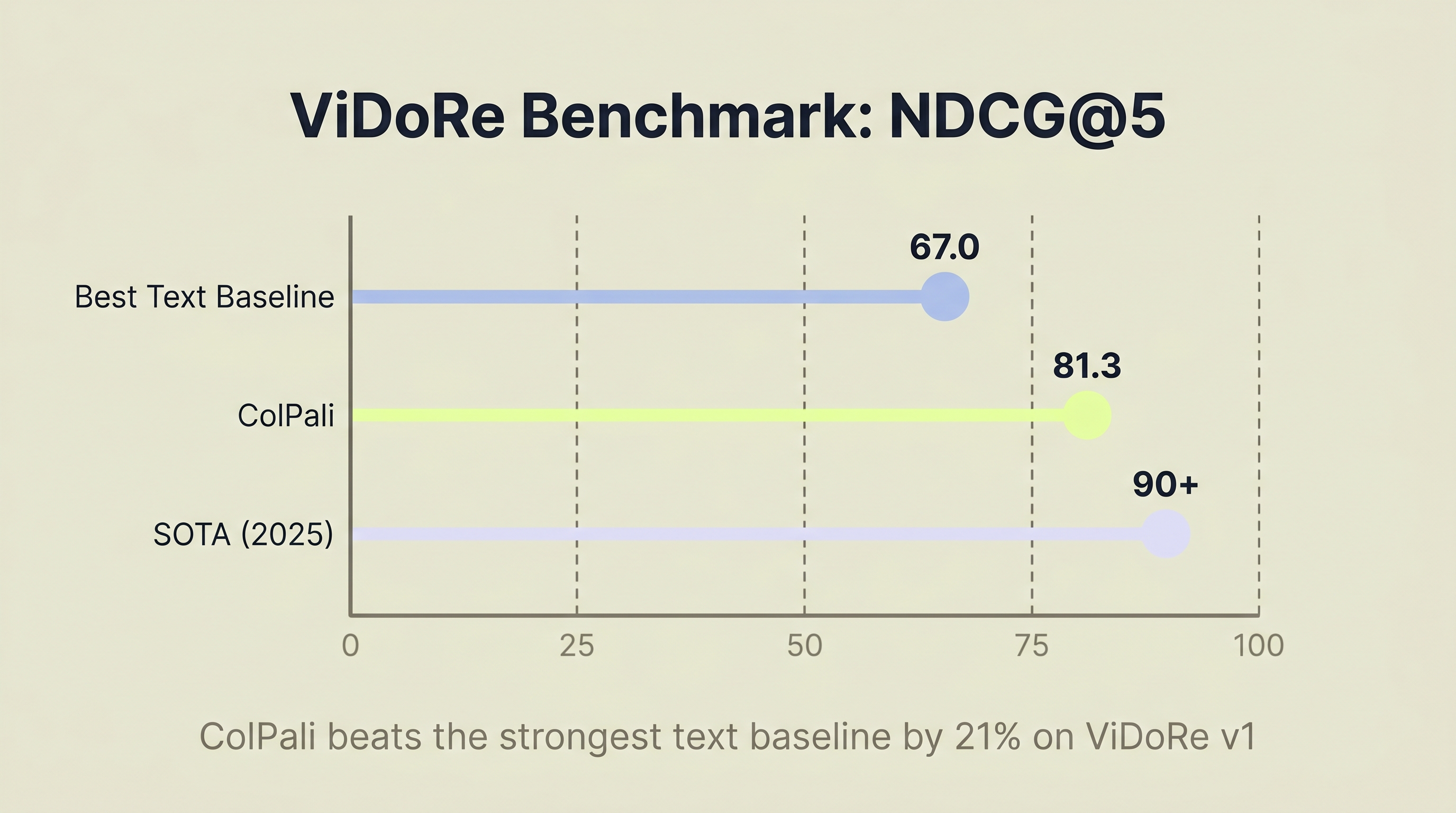
Source: Faysse et al., ICLR 2025; Hugging Face ViDoRe team, 2025
How Does a Visual Retrieval Stack Work in Practice?
In practice, the most important design choice is simple: let visual retrieval handle recall, and keep text parsing out of the recall decision. That keeps brittle extraction from deciding which pages are relevant in the first place.
That tradeoff matters more than polished architecture diagrams. The real question is whether the workflow exposes a real enterprise pain point: poor page recall on messy PDFs, followed by expensive manual work to recover the missing evidence.
The most useful lesson in the ComplianceGuard implementation is that visual retrieval and text parsing do different jobs. Visual retrieval finds the right page. LandingAI's document parser is computed and cached during ingestion. The compliance workflow only reads those cached chunks later, on a much smaller candidate set, when it needs quotes or structured evidence.
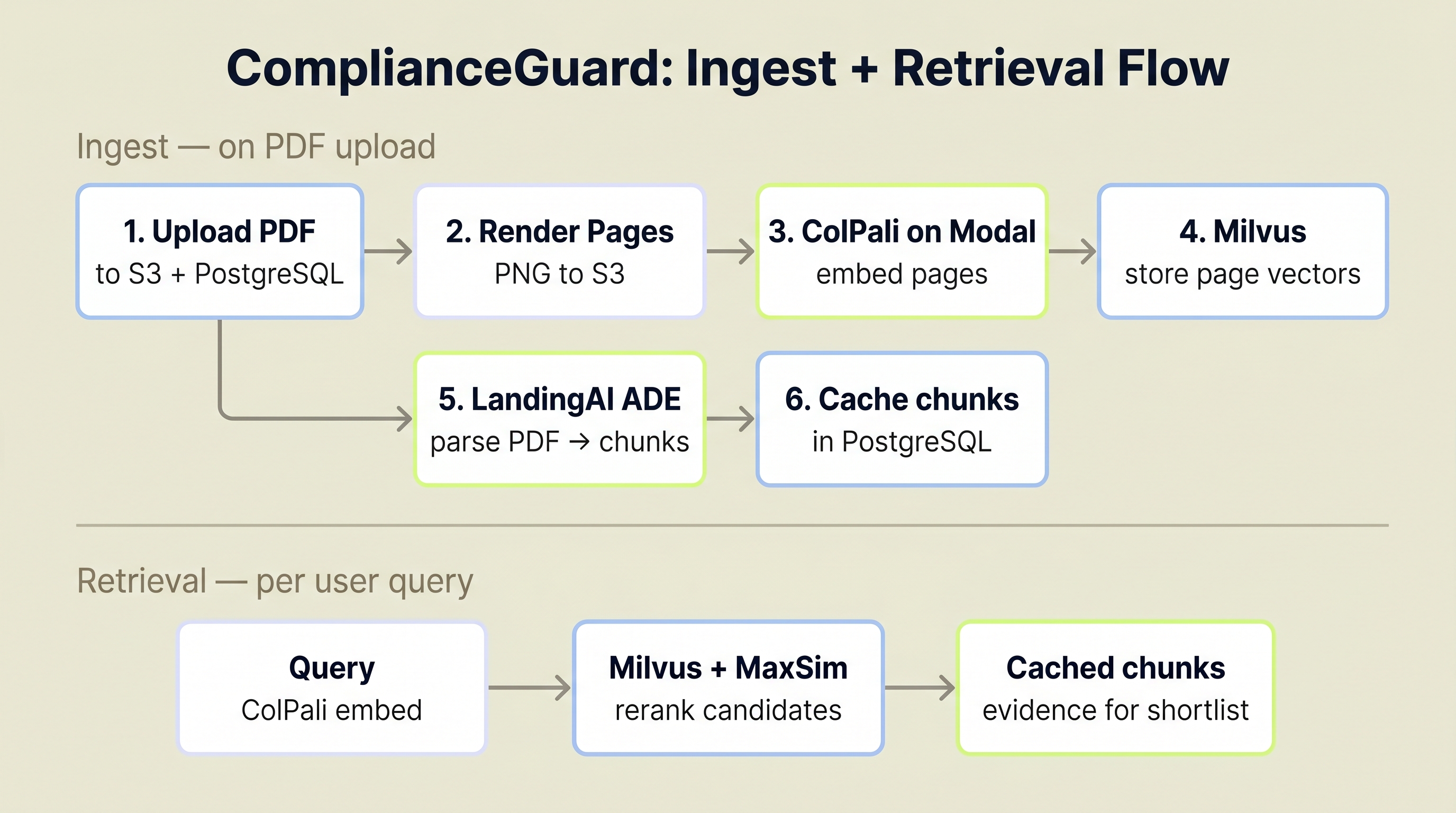
Visual retrieval owns recall here. LandingAI ADE runs during ingestion to cache chunks, and later compliance scans read only the cached chunks for the shortlisted pages.
Architecture and Data Stores
ComplianceGuard's architecture uses three data stores, each handling a distinct concern. PostgreSQL stores document metadata and the extracted page-level chunks used later in analysis. Milvus stores the ColPali multi-vector embeddings for candidate retrieval. S3 stores the original PDFs and extracted page images.
Ingestion Pipeline
The end-to-end ingestion pipeline has two outputs: a visual index for recall and a parsed-text cache for downstream analysis.
- PDF uploaded to S3, metadata record created in PostgreSQL
- Each page rendered as a PNG image, uploaded to S3
- Page images sent to ColPali (hosted on Modal as a serverless GPU endpoint)
- ColPali returns 128-dimensional multi-vector embeddings per page, which are stored in Milvus
- The original PDF is sent to LandingAI ADE, which returns markdown, chunks, and page splits for later use in analysis
- The ingestion task stores those chunks in PostgreSQL so later compliance runs can fetch page-grounded text without reparsing the whole document
In the project README, the visual indexing path is documented at roughly 5 seconds per page, or about 24 seconds for a 5-page document. Celery workers handle ingestion asynchronously so the API stays responsive during bulk uploads.
One practical detail worth calling out: if LandingAI extraction fails, the system keeps the Milvus index and continues instead of discarding the document. That is a pragmatic design choice that also maps well to production reality. Recall and parsing fail differently, so the pipeline should let you retry one without rebuilding the other.
Search and Reranking
Search queries hit the same ColPali endpoint for query embedding. Milvus retrieves candidate page vectors, and the application reranks them with normalized MaxSim in application code. Each result includes the page number, similarity score, and a link to the page image on S3 so users can visually verify the match.
The key architectural decision here is page-level retrieval, not chunk-level retrieval. Traditional RAG systems chunk documents into 500-token blocks. ComplianceGuard retrieves entire pages because the visual context (where something appears on the page and what sits next to it) carries information that chunking destroys. For more on preparing document outputs for vector databases, see Document Extraction for RAG.
Compliance Scan Path
The compliance scan path adds one more layer on top of that generic search flow. The analyzer queries both the framework index and the user-doc index in parallel, then pulls cached LandingAI chunks for both result sets before handing the evidence to Gemini for comparison.
As a result, parsing is decoupled from recall. LandingAI stores markdown and chunks in PostgreSQL and lets Gemini and human reviewers work from cached page-grounded evidence after retrieval has already narrowed the candidate set. That gives enterprise teams something more actionable than a retrieval score: evidence they can inspect.
Does Vision-Based Search Actually Outperform Text-Based?
Yes, on visually rich retrieval tasks, visual methods clearly beat text-first baselines. The gains are strongest where layout and page structure carry meaning.
ColPali beats the best text extraction baseline on ViDoRe by 14.3 NDCG@5 points (81.3 vs. 67.0) (Faysse et al., ICLR 2025). In a separate 2025 financial-benchmark study, direct multimodal retrieval beat LLM-summary-based retrieval by 32% on mAP@5 and 20% on NDCG@5 (Lumer et al., arXiv:2511.16654). That second result is promising, but it comes from a small benchmark of 40 financial question-answer pairs, so it should be treated as directional rather than universal.
ComplianceGuard observation: On SEC regulatory filings with nested disclosure tables and cross-referenced footnotes, page-level visual retrieval is a better fit than flattening everything into text chunks. The tables and structured disclosures that carry compliance signals are exactly the parts of the page where layout matters most.
Where does visual retrieval win decisively? Documents with visual structure: tables, charts, infographics, forms, multi-column layouts, and anything with spatial relationships between elements. ColPali's strongest ViDoRe scores come from visually complex domains:
| Domain | ColPali NDCG@5 |
|---|---|
| Healthcare | 94.4 |
| Government | 92.7 |
| Energy | 91.0 |
| TabFQuAD (table QA) | 83.9 |
| Overall ViDoRe v1 | 81.3 |
| Best text baseline | 67.0 |
Where does text-based search still hold up? Pure prose documents, legal briefs with minimal formatting, well-structured markdown. If a document is 100% running text with no tables, charts, or complex layout, a text extraction pipeline won't lose much. But how many enterprise documents are pure prose? Not many.
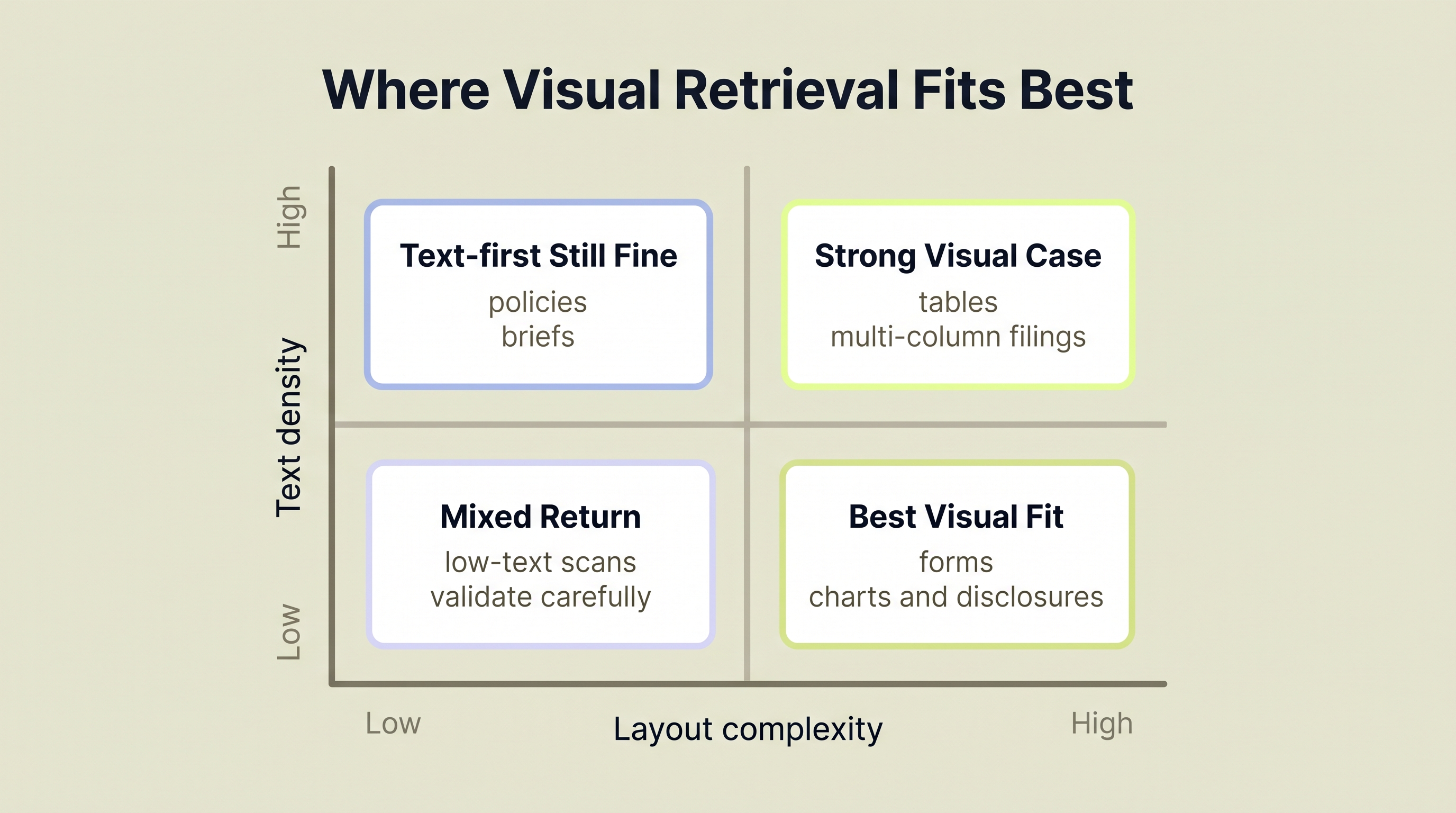
Visual retrieval becomes most attractive as layout complexity rises and document meaning depends more on page structure than on plain running text.
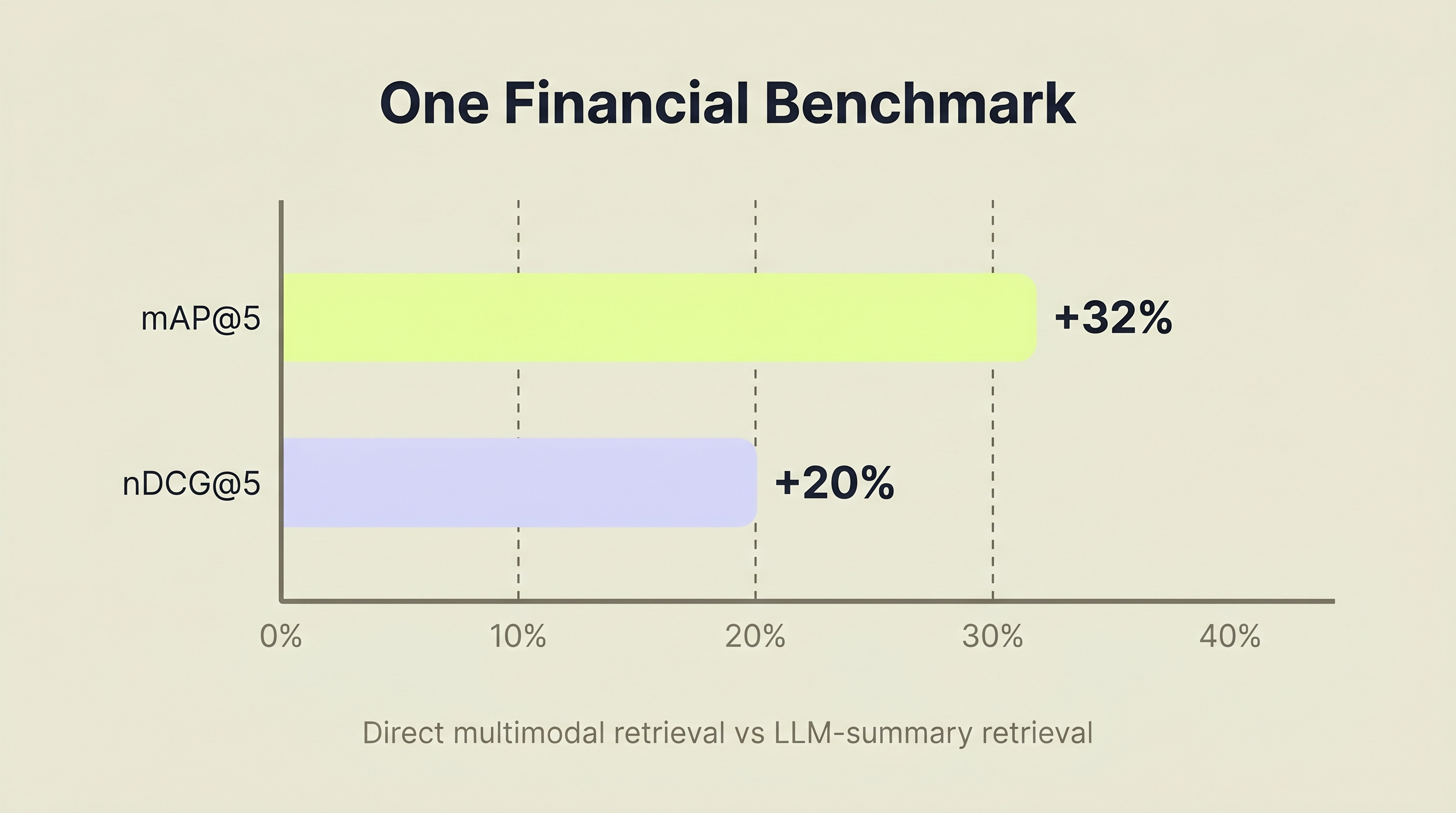
Source: Lumer et al., arXiv:2511.16654, 2025. Results are from a 40-question financial benchmark.
For enterprise teams, the most important takeaway is not the benchmark leaderboard by itself. It is the failure pattern behind the numbers. If your users keep opening the wrong page because table structure and footnotes were flattened away upstream, faster OCR alone will not restore trust. The ComplianceGuard pattern suggests changing the recall layer first, then deciding how much cached parsing you actually need.
What Should You Consider Before Building This Stack?
The main tradeoff is straightforward: visual retrieval usually buys better recall on complex pages, but it costs more in GPU time, storage, and ingestion latency. Teams should evaluate it on retrieval quality first, not on trend momentum.
The goal here is not to prove that visual retrieval is the future of RAG. It is to answer a narrower and more useful question: does page-level recall plus cached document parsing solve a real document pain point better than the OCR-first workflow your team already has?
Compute costs are real but manageable. ColPali embedding generation requires GPU inference. Running your own GPU cluster is expensive. ComplianceGuard solves this by using Modal, a serverless GPU platform, which means paying per-invocation rather than maintaining always-on infrastructure. In the repository's documented setup, ingestion runs at roughly 5 seconds per page, covering PDF conversion, page-image upload, embedding fetch, and Milvus insertion. For a 1,000-page corpus, that implies roughly 83 minutes of ingestion work.
Storage grows faster than text-based approaches. Multi-vector embeddings produce more data per page than a single dense vector. Each page generates multiple 128-dimensional vectors (one per image patch token), compared to a single 768 or 1536-dimensional vector in a text embedding approach. Milvus handles this well, but plan storage accordingly.
Latency is acceptable for search, not for real-time ingestion. NVIDIA's 2025 comparison found the vision-heavy path significantly slower on throughput (NVIDIA, 2025):
| Approach | Throughput | Structural fidelity |
|---|---|---|
| OCR extraction | 8.47 pages/sec | Loses layout, tables |
| VLM-based (visual) | 0.26 pages/sec | Preserves layout, tables |
That is roughly 32x slower. Not a direct ColPali benchmark, but a useful reminder that vision-heavy ingestion costs more. Batch processing with async workers (like ComplianceGuard's Celery setup) is how you absorb that latency.
LandingAI ADE reduces downstream plumbing, not upstream recall risk. Here, the parser handles the full PDF during ingestion, turning it into markdown, page chunks, and table-aware content, then lets the compliance workflow reuse that cache later. That helps enterprise teams avoid writing bespoke parsing code for every PDF layout, but it still does not decide recall. For a detailed comparison of document parsing options, see LandingAI ADE vs. LlamaParse.
The real question isn't just speed, it is retrieval quality. Visual retrieval trades ingestion speed and storage efficiency for better preservation of layout and visual context. For compliance, legal, and financial use cases where missing structure is costly, that trade can be worth making.
What This Means for Enterprise Document Teams
The traditional PDF search pipeline (extract, chunk, embed, search) was designed for a world where documents were mostly text. Many enterprise documents aren't mostly text. They're tables, charts, forms, and structured layouts where spatial relationships carry meaning.
The pattern suggests a cleaner division of labor. Visual document retrieval treats each page as an image, encoding the complete visual context into multi-vector embeddings. On ViDoRe, ColPali scores 81.3 NDCG@5 against 67.0 for the strongest text baseline, and newer models have pushed past 90 on ViDoRe v1. That makes visual retrieval a serious option for visually complex corpora.
As a reference implementation, ComplianceGuard proves a more practical point than "OCR is dead." It shows that if layout is part of the meaning, page-level visual retrieval deserves to own recall. From there, downstream analysis can work on the far smaller set of pages that actually matter, using cached parsing output instead of forcing extraction to make the recall decision.
ComplianceGuard implements one version of this stack for SEC compliance scanning: ColPali on Modal for embeddings, Milvus for multi-vector candidate retrieval, FastAPI for the API, PostgreSQL for metadata and cached chunks, normalized MaxSim reranking in application code, and LandingAI ADE during ingestion to cache page-grounded text.
For enterprise teams running into the same PDF pain points (wrong-page recall, brittle table extraction, expensive evidence review), the takeaway is: preserve layout at retrieval time, cache document parsing separately, and let the compliance workflow read only the page-grounded evidence it actually needs.
Next Steps
- Explore the build. Tilak Sharma and Hrishikesh D Kakkad open-sourced the full implementation. The source code is on GitHub if you want to read the pipeline end to end.
- Talk to LandingAI. Scoping a compliance scan, regulatory intake, or contract management workflow? Email us to discuss applying the same extraction pattern to your documents.
Frequently Asked Questions
What is ColPali and how does it work for document retrieval?
ColPali is a vision-language model for document retrieval published at ICLR 2025. It uses PaliGemma-3B to generate ColBERT-style multi-vector embeddings directly from page images, bypassing OCR entirely. It scores 81.3 NDCG@5 on the ViDoRe benchmark versus 67.0 for the strongest text extraction baseline (arXiv:2407.01449).
Does visual retrieval replace OCR entirely?
Not in ComplianceGuard. ColPali handles recall. The system separately runs LandingAI ADE during ingestion and caches the resulting chunks in PostgreSQL. Later stages read the cached text for the shortlisted pages when the compliance workflow needs quotes or structured analysis. The key design change is keeping parsing separate from recall, not eliminating parsing.
Where does LandingAI fit in ComplianceGuard?
LandingAI ADE is the document-processing intelligence layer. During ingestion, the system sends the original PDF to ADE and stores the returned markdown, chunks, and page splits in PostgreSQL. During compliance analysis, it fetches those cached chunks for pages that visual retrieval already shortlisted. The result: less custom parsing code, more page-grounded evidence.
Can visual document retrieval handle scanned PDFs?
Yes. Visual retrieval works well on scanned PDFs because it treats pages as images instead of relying on extracted text. That said, render quality, language coverage, and document type still matter. The ColPali model card notes that the model is primarily focused on PDF-type documents and high-resource languages, so photographed documents and out-of-distribution layouts deserve extra validation.
How does visual retrieval compare to text-based RAG for cost?
Visual retrieval costs more to index because it requires GPU inference for embedding generation, roughly 5 seconds per page in this setup versus sub-second for most text pipelines. The trade only makes sense when retrieval quality depends heavily on tables, charts, or layout. For a deeper look at preparing document outputs for vector databases, see Document Extraction for RAG.
What vector database works best for ColPali multi-vector embeddings?
Milvus works well here because it stores per-page multi-vector embeddings and returns candidate sets efficiently. In ComplianceGuard, normalized MaxSim reranking happens in application code after candidate retrieval, so the key requirement is efficient multi-vector storage plus fast lookup, not built-in MaxSim support.