

TL;DR
A DPT-3 parse returns exactly three top-level fields that describe the same document three different ways:
markdown— the whole document as one continuous, reading-order string. Read it.structure— a typed tree of blocks, each carrying its own grounding. Locate it.metadata— the receipt for the job: model version, page count, duration, billing. Account for it.
Grounding rides inline on every block, so any value you see traces straight back to where it appears on the page.
Video Walkthrough
A guided tour of the parse response and how the three fields fit together:
Three Things Back
Send a document to the Parse API and you get back one object with three top-level fields. Here's a real response in the playground:
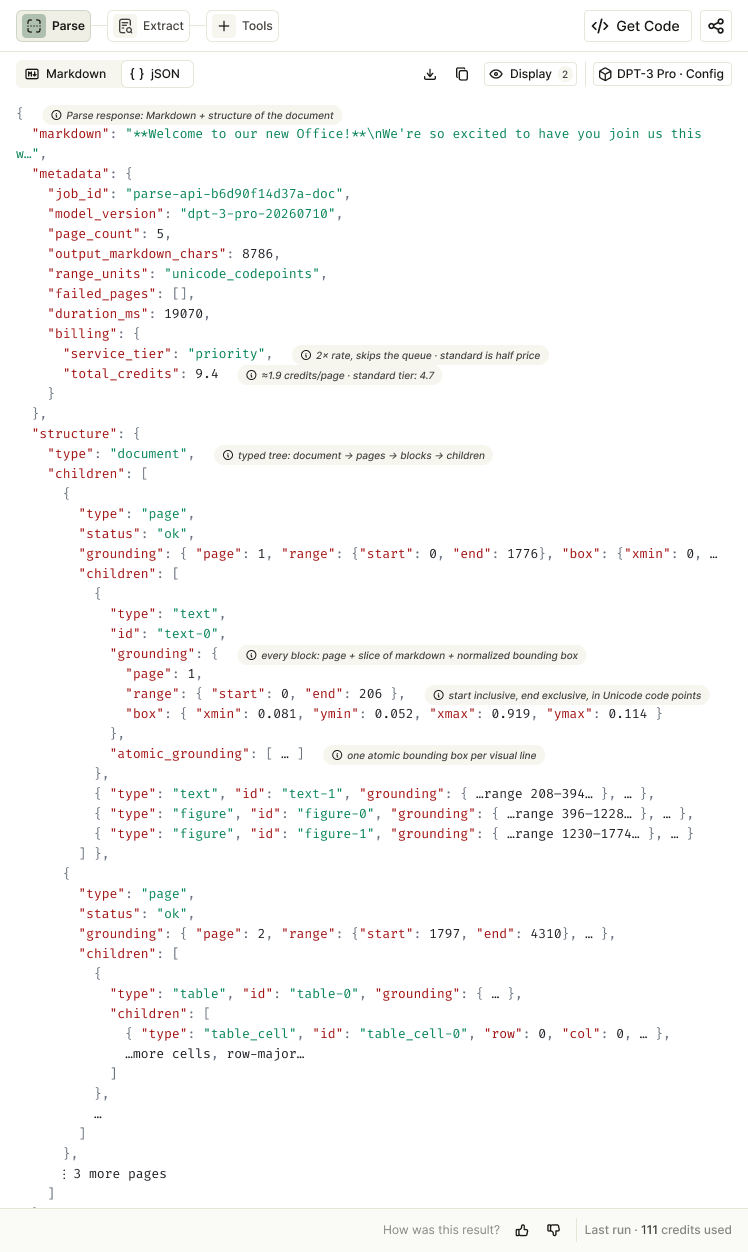
markdown— the document as one Markdown string.structure— a tree of blocks plus grounding.metadata—job_id,model_version,page_count, and more.
Three views, one document. Each field describes the same underlying pages from a different angle.
markdown — One String
The whole document comes back as a single, continuous, reading-order Markdown string. Everything is inline, in the order a human would read it:
- Tables render as
<table>with merged cells preserved. - Figures and charts become
<figure type="CHART">blocks with a description. - Signatures, stamps, and illegible marks are tagged inline:
[SIGNED],[STAMPED],[ILLEGIBLE_SIGNATURE]. - Page boundaries are marked with
<!-- PAGE BREAK -->, and the document carries a<!-- doc_id=<job_id> -->comment.
This is the field you feed straight into a chunker or an LLM context window.
structure — The Map
Where markdown is text, structure is a typed tree: document → page → blocks. The root is the document; pages hang off the root; and each page contains typed leaf blocks.
DPT-3 emits nine block types:
text · table · table_cell · figure · marginalia · attestation · logo · card · scan_code
One table_cell block covers every cell — header rows included. Each leaf block is a typed piece of the document you can route, filter, or extract from.
Grounding rides inline
Every block carries its own location, right on the block:
page— 1-indexed page number (e.g.3).range { start, end }— character offsets into the markdown string (e.g.{ 1420, 1498 }).box { xmin … ymax }— normalized 0–1 coordinates on the page (e.g.{ 0.14, 0.35, 0.62, 0.44 }).
atomic_grounding — one box per line
Leaf blocks refine the single block-level box into a finer box for every visual line of text. A block that renders as five lines produces five entries in atomic_grounding[], each with its own { page, range, box }. Line-level boxes are what let you highlight a single sentence rather than a whole paragraph.
metadata — The Receipt
metadata records the facts of the job — no document content, just bookkeeping:
metadata {
  job_id: "parse-01k04g2…sd4tfe"
  model_version: "dpt-3-pro-20260710"
  page_count: 14
  output_markdown_chars: 52710
  duration_ms: 17266
  failed_pages: []
  range_units: "unicode_codepoints"
  billing: {
    service_tier: "priority"
    total_credits: 21
  }
}
How an Offset Works
A range points into the markdown string by code-point index — start is inclusive, end is exclusive. So for a string beginning Inv · ACME · …:
range: { start: 4, end: 8 } → markdown[4:8] = "ACME"That same convention ties the structure tree back to exact spans of the markdown string.
One Value, Three Ways to Trace
Take a single value — say $450 in a table cell. It shows up in all three fields at once:
- It appears in
markdownas<td> $450 </td>. - It's located in
structureas atable_cellblock withpage,range, andbox. - It's traced by
metadatathrough thejob_idthat ties it to this exact parse.
Every output traces back to where it appears on the page, and the job_id ties it to the run that produced it.
Read, Locate, Account
Three fields, three jobs — and grounding makes every value traceable:
markdown→ read it.structure→ locate it.metadata→ account for it.
Grounding rides inline on every block, so every value is traceable back to the page it came from.
Getting Started
- Read the documentation — full reference for the Parse API and response shape.
- Try the playground — parse your own document and inspect all three fields.