
A signature, a stamp, or a seal is often the single element that makes a document official. It is also the part that most document pipelines quietly throw away.
Traditional OCR and text extraction read the body copy of a page and treat a stamp or a handwritten signature as noise, or as an unlabeled image blob. A system can transcribe every line of a contract, a permit, or a certificate of origin and still not register whether the document was signed, stamped, or sealed. For teams processing regulated and official paperwork, that missing answer is the one that matters.
Agentic Document Extraction (ADE) closes that gap with automatic attestation detection. At the parse stage, ADE detects these marks, called attestations, assigns each a type, transcribes any text inside or around it, and records where it sits on the page. The mark that confers authority on a document becomes a structured, queryable field instead of a manual eyeball check.
What an attestation is, and how it shows up in the parse output
ADE calls these marks attestations. The definition is simple: an attestation is "a certification, stamp, or signature region."
Every attestation ADE finds gets one or more of four type labels:
- SIGNED for a handwritten or wet signature.
- E-SIGNED for an electronic signature.
- STAMPED for an ink or scan stamp.
- SEALED for an official seal.
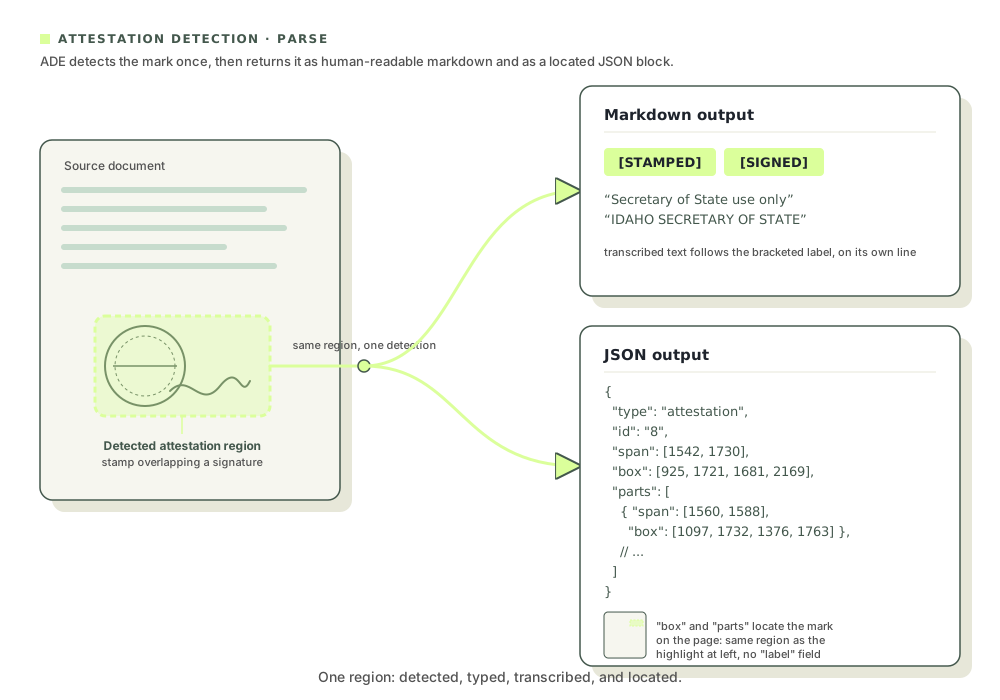
Those four are the complete set. Labels can also stack on a single region when a mark carries more than one kind of attestation. A block that is both stamped and signed comes back as [STAMPED][SIGNED], which is common on official filings where an authority stamps and signs the same area.
You get the results in two forms. In the markdown field, an attestation appears as a bracketed [TYPE] label on its own line, followed by the transcribed text of the mark and any printed text around it. In the structure field, returned as JSON, the same attestation is a block node with type: "attestation", carrying the usual id and span fields plus grounding data: a bounding box and parts that place the region on the page down to the line. So you can answer three questions at once. Is this signed? What does the mark say? Where on the page is it?
One model note before you build. Both DPT-3 Pro and DPT-3 Verity return attestation blocks, but Verity is built for digitally created text and does not handle scanned pages or handwriting. Attestation marks are frequently handwritten, stamped, or captured by scan, so select DPT-3 Pro when your workflow depends on knowing whether a document is signed, stamped, or sealed.
The documents that live or die by their marks
Plenty of high-stakes document classes are defined by a certification, stamp, or signature region. If you process any of these, attestation detection is doing work that text extraction alone cannot:
- Trade and customs documents such as certificates of origin (including GSP Form A), bills of lading, and customs declarations. A certificate of origin certifies where goods were made and is stamped and signed by an authorized chamber or government office.
- Business and government filings such as certificates of organization or incorporation, permits, and Secretary of State stamps.
- Notarized documents such as affidavits, deeds, and powers of attorney, which carry a notary's signature and seal.
- Legal and contractual documents such as contracts, agreements, and court filings with wet or electronic signatures.
- Financial and banking documents such as loan agreements, guarantees, and bank letters with authorized signatures and corporate seals.
- Credentials and records such as diplomas, transcripts, and licenses bearing an institutional seal and signature.
- Regulated and quality documents such as certificates of analysis or conformance, inspection certificates, and medical and insurance forms with authorizing signatures.
Two real documents show how this plays out. The first is a clean government filing with several kinds of marks. The second is a messy, non-English trade document where the marks overlap the text.
Example 1: A Certificate of Organization business formation document
The first document is an Idaho Certificate of Organization for a limited liability company, CAPITAL ASSET REALTY, LLC. It is a typical business filing, and it carries a lot of marks: a state seal, a "FILED EFFECTIVE" stamp, a dated Secretary of State scan stamp, organizer signatures, and a receipt block from the filing office.
Here is the whole certificate as ADE returns it, with every detected attestation region highlighted in place.
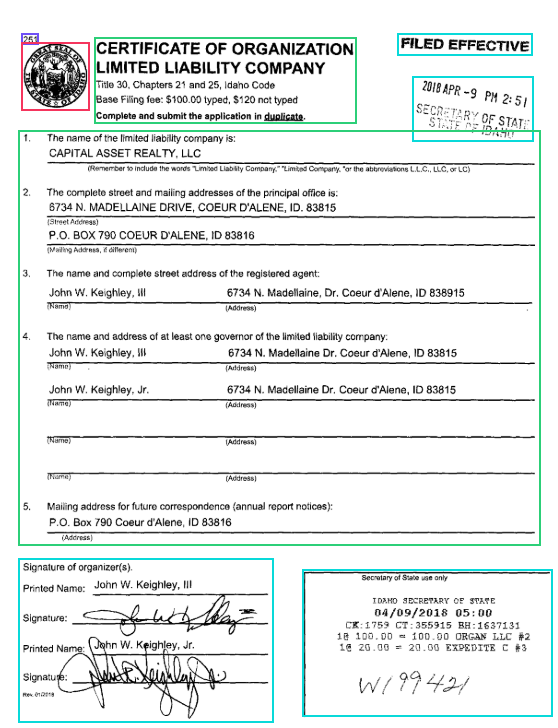
Figure 1: The full Idaho Certificate of Organization with ADE's detected attestation regions highlighted.
ADE surfaced each of these as a separate attestation region.
The scan stamp near the top of the page came back as a [STAMPED] region, with the stamp text transcribed as "2018 APR -9 PM 2:51" and "SECRETARY OF STATE STATE OF IDAHO." A stamp that a text-only parser would likely garble or drop is now a typed, located element.
Further down, the organizer signature block came back as [SIGNED]. ADE kept the printed context ("Signature of organizer(s)", printed names) and marked each actual signature as a [HANDWRITTEN_SIGNATURE] region, so the ink is preserved as a located mark rather than forced into the wrong characters.
One caveat on these inner labels: the four attestation type labels above ([SIGNED], [E-SIGNED], [STAMPED], [SEALED]) are a fixed set, but the content descriptions ADE writes inside a region, like [HANDWRITTEN_SIGNATURE] here or [STAMP OF REPUBLIC OF INDONESIA] in the next example, are generated per document. They describe what ADE saw and can vary between files, or even between two runs of the same file, so treat them as descriptions rather than fixed values. The only hard-coded content literals are [ILLEGIBLE_SIGNATURE] and [ILLEGIBLE_TEXT].
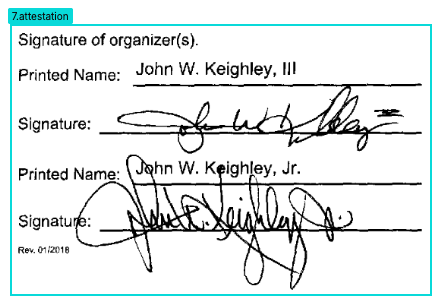
Figure 2: The organizer signature block returns as a SIGNED attestation, with each signature captured as a handwritten signature region.
The most useful case is the Secretary of State receipt block at the bottom, which is both stamped and signed. ADE returned it as a stacked [STAMPED][SIGNED] region and transcribed the filing detail inside it, including the transaction line "CK:1759 CT:355915 BH:1637131" and the receipt number "W199421."
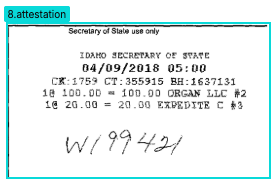
Figure 3: The Secretary of State receipt block returns as a stacked STAMPED and SIGNED attestation.
Here are those attestation regions in the parsed Markdown, straight from the output. Notice the bracketed attestation labels ([STAMPED], [SIGNED], and the stacked [STAMPED][SIGNED]), along with the [HANDWRITTEN_SIGNATURE] markers that describe the mark content inside a signed region.
[STAMPED]
FILED EFFECTIVE


[STAMPED]
2018 APR -9 PM 2:51
SECRETARY OF STATE STATE OF IDAHO

[SIGNED]
Signature of organizer(s).
Printed Name: John W. Keighley, III
[HANDWRITTEN_SIGNATURE]
Printed Name: John W. Keighley, Jr.
Signature:
[HANDWRITTEN_SIGNATURE]
Rev. 01/2018
[HANDWRITTEN_SIGNATURE]


[STAMPED][SIGNED]
Secretary of State use only
IDAHO SECRETARY OF STATE
04/09/2018 05:00
CK:1759 CT:355915 BH:1637131
1@ 100.00 = 100.00 ORGAN LLC #2
1@ 20.00 = 20.00 EXPEDITE C #3
W199421
One document, three attestation types, including a stacked label, and signatures kept as regions instead of being mistranscribed. That is the behavior you want on a filing where the marks are the record.
Example 2: A Certificate of Origin Trade Document
The second document is harder. It is an Indonesian Certificate of Origin (GSP Form A) for a shipment of wood and coconut handicrafts, bound for the United States. It is a scanned trade document, not in clean English throughout, and the certifying marks sit right on top of the printed form text.
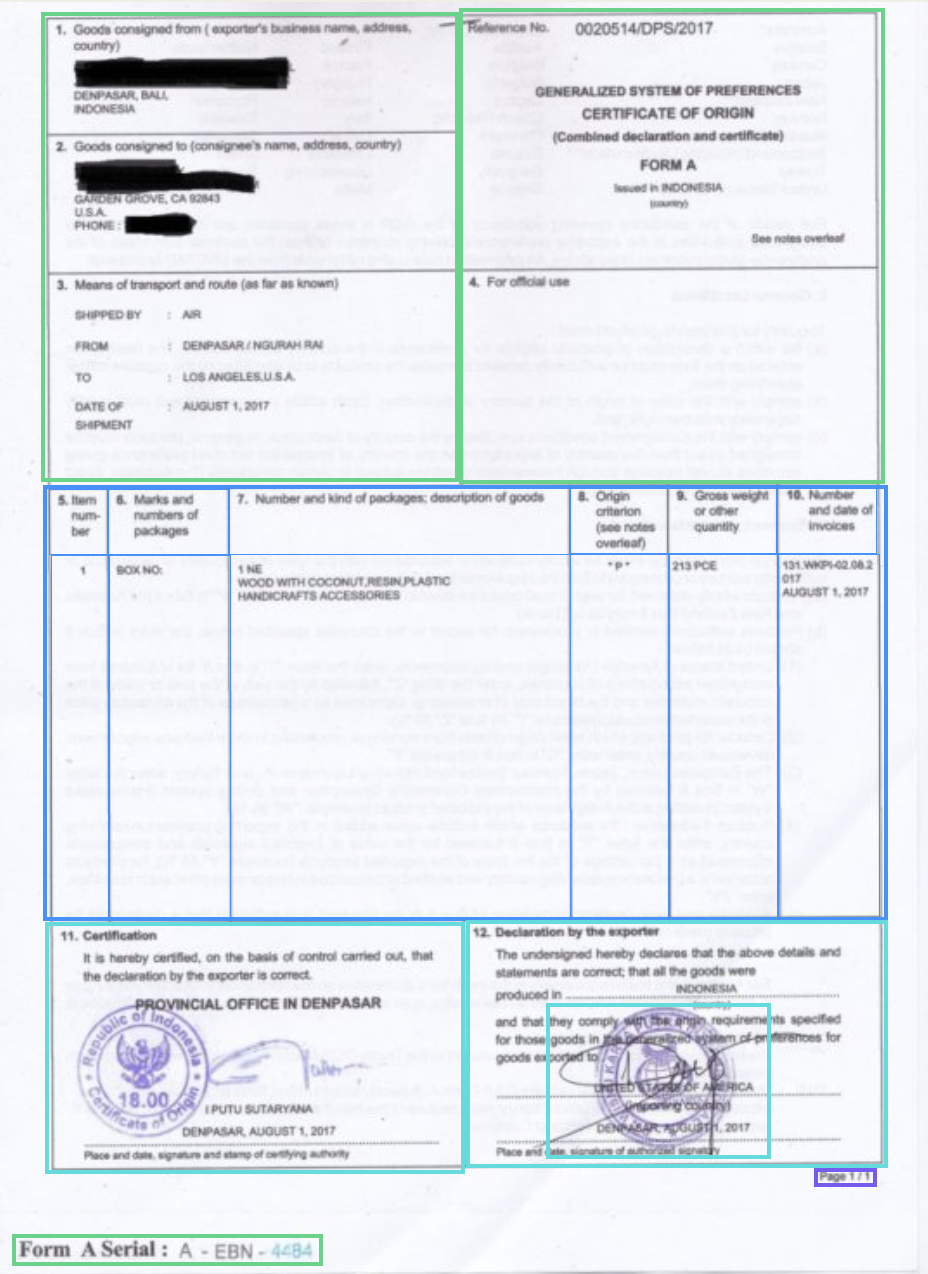
Figure 4: ADE detects the certification and declaration marks on a scanned, stamped-over trade document.
Box 11, the certification box, is the authority's mark. ADE returned it as a stacked [STAMPED][SIGNED] region and transcribed the surrounding text: the certification statement, "PROVINCIAL OFFICE IN DENPASAR," a [STAMP OF REPUBLIC OF INDONESIA] region for the official seal, and a [HANDWRITTEN SIGNATURE] region for the signature of the certifying official.
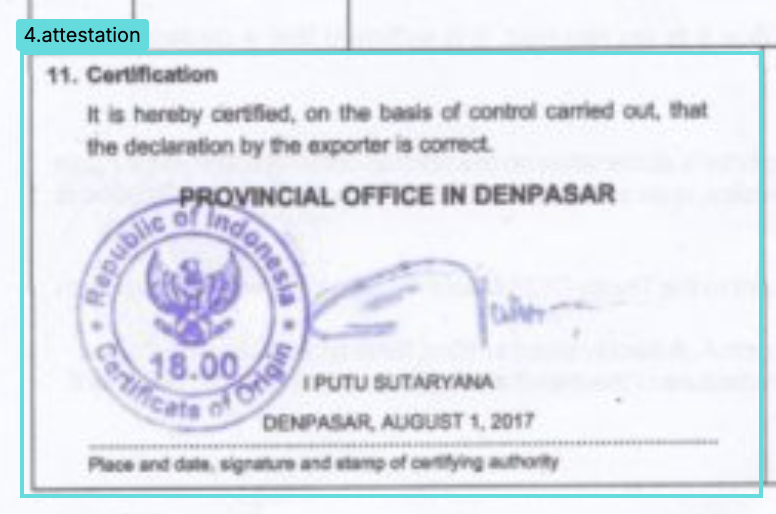
Figure 5: Box 11 certification returns as a stacked STAMPED and SIGNED attestation, including the official seal and signature.
Box 12, the exporter's declaration, came back as a [STAMPED] region, with a separate [STAMP_AND_SIGNATURE] region captured inside the declaration text. ADE held up even where a stamp and a signature overlap the printed statement.
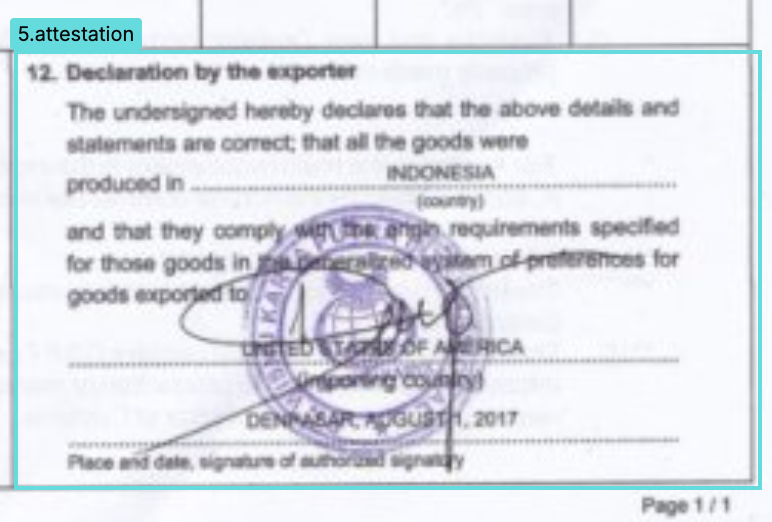
Figure 6: Box 12, the exporter declaration, returns as a STAMPED attestation with an overlapping stamp and signature region.
Here are both boxes in the parsed Markdown, exactly as ADE returned them. The output keeps the mixed English and Indonesian text, the form's dotted fill lines, and the marks layered over the statement. That messiness is the point: the [STAMPED][SIGNED] and [STAMPED] attestation labels still land, and content markers like [STAMP OF REPUBLIC OF INDONESIA] and [STAMP_AND_SIGNATURE] describe what sits inside each region.
[STAMPED][SIGNED]
11. Certification
It is hereby certified, on the basis of control carried out, that
the declaration by the exporter is correct.
PROVINCIAL OFFICE IN DENPASAR
[STAMP OF REPUBLIC OF INDONESIA]
[HANDWRITTEN SIGNATURE]
PUTU SUTARYANA
DENPASAR, AUGUST 1, 2017
Place and date, signature and stamp of certifying authority


[STAMPED]
12. Declaration by the exporter
The undersigned hereby declares that the above details and
statements are correct; that all the goods were
produced in ............................................ INDONESIA
(country)
and that they comply with the origin requirements specified
for those goods in the generalized system of preferences for
goods exported to:
[STAMP_AND_SIGNATURE]
UNITED STATES OF AMERICA
(importing country)
DENPASAR, AUGUST 1, 2017
Place and date, signature of authorized signatory
This is the real-world case. The scan quality is imperfect, the language is mixed, and the marks are layered over form text. Attestation detection still identifies, types, and locates them.
Why this matters downstream
Turning marks into structured fields changes what your automation can do.
Verification becomes a field. "Is this document signed, stamped, or sealed?" turns into a value your code can read, which lets you build straight-through processing with a verification gate instead of a manual review step.
Exceptions route themselves. A document that is missing an expected SIGNED, STAMPED, or SEALED region can be flagged automatically for a human to look at, while the complete documents pass through.
The result is auditable. Because every attestation carries grounding coordinates, a system can show exactly where a mark sits on the page. That traceability matters in compliance settings, where every decision has to be defensible.
Avoid a bespoke model. Attestation detection ships as part of the parse response, so teams avoid training and maintaining a separate signature or stamp detector. It works through one API, on the same messy, scanned, multilingual documents you already handle.
Try it
Parse one of your own signed, stamped, or sealed documents in the Playground with DPT-3 Pro and look at the attestation regions it returns. Then read the attestation documentation for the full label reference and the Markdown and JSON output formats.
The marks that make your documents official are worth capturing. With ADE, they come back as data.