
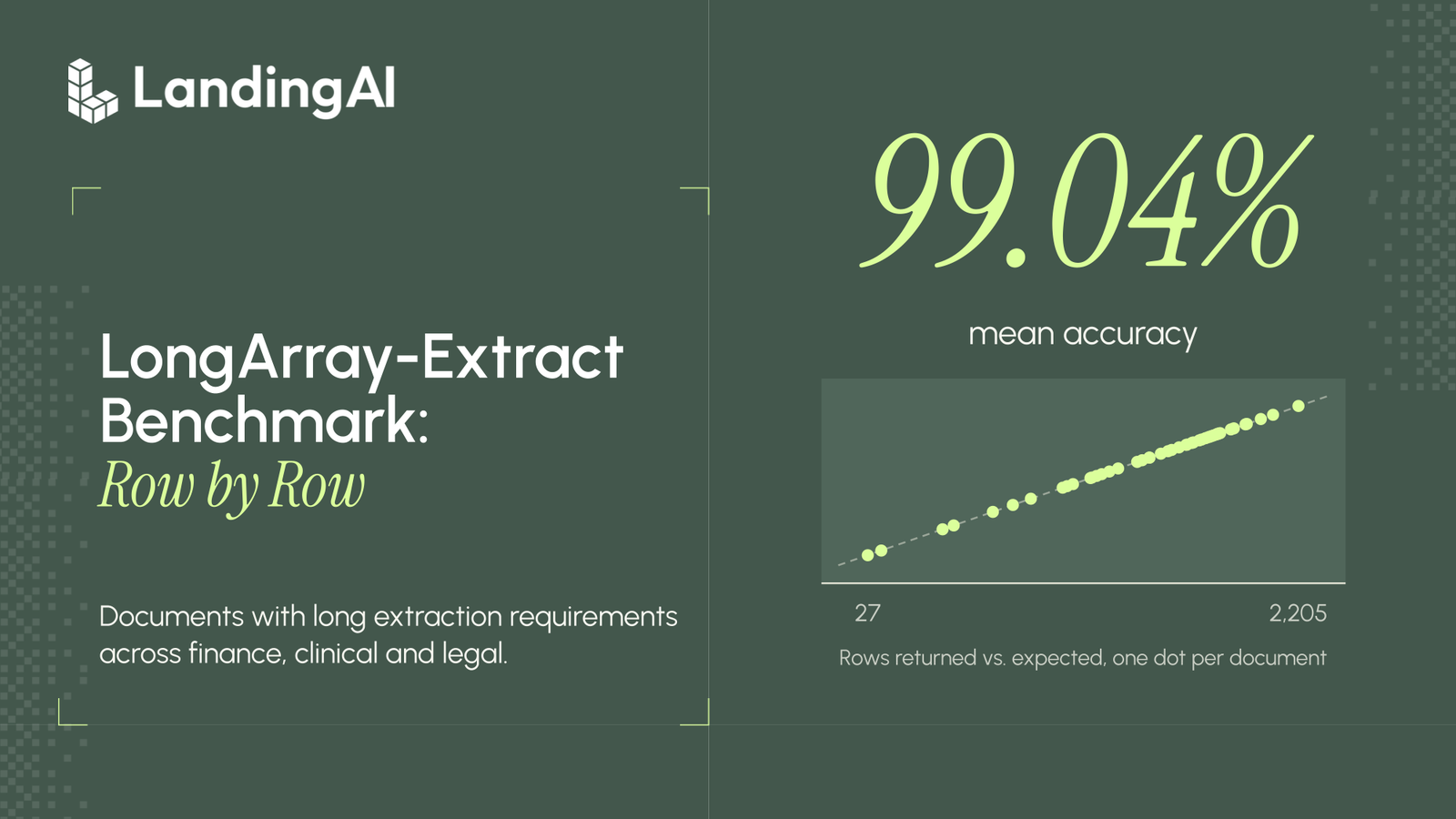
LandingAI Parse and Extract scored 99.04% on LongArray-Extract, Extend's public benchmark for long lists in documents, and 99.26% when three answer-key format differences are counted as correct. It returned 29,331 rows against 29,328 expected across 45 documents of up to 235 pages. Document extraction tends to break when the list gets long: bank statements with 700 transactions, adverse-event reports that run past 200 pages and pleadings with over a thousand charged acts. These are ordinary documents in finance, life sciences and law.
- Mean per-document accuracy
- 99.04%
- Failed documents count as 0%
- Completion
- 45/45
- Every document returned a result
- Largest array
- 2,205
- Transactions in one statement, all returned
- Mean wall-clock
- 457s
- Per document, async jobs on the standard tier
What is a long array?
A long array is a list of records that repeats through a document, where every record has the same fields. Each transaction on a bank statement is one record, with a date, amount, description and type. Each adverse event in a clinical safety report is another, with a subject, a term, a severity and an outcome. When you extract one of these lists into JSON, you get an array with one item per record.
Long arrays show up wherever a business document is mostly a list:
- Bank, brokerage and card statements
- Adverse-event and lab listings in clinical trials and pharmacovigilance
- Charged acts, counts and parties in legal pleadings
- Invoices, bills of lading and packing lists with many line items
- Claims listings and schedules in insurance
The list can run to thousands of rows across hundreds of pages, and the downstream work needs every one of them. A reconciliation that is missing one transaction doesn't balance.
Why long arrays are hard
Pulling one total off an invoice is easy. Pulling every row of a list that spans dozens of pages is not:
- Rows get dropped or duplicated where a table breaks across pages. The last row on one page and the first on the next are easy to lose or to read twice.
- Repeated headers and subtotals look like data. Each page restates the column headers, and many statements print running balances and page totals.
- A row needs context from elsewhere. The account number is in the statement header. In a clinical listing, the subject number and treatment group open a block of events that can continue onto the next page, and the subject's age and race sit in a separate table nearly 100 pages earlier.
- The output is long. A 1,283-row report with 25 fields per row is more than 32,000 values. A model asked to write that in one response tends to stop early or skip rows.
LandingAI's result
In June 2026, Extend published LongArray-Extract, an open benchmark for exactly this problem, with the documents and the scoring code public. LongArray-Extract has 45 synthetic documents, 2,152 pages in all, from three verticals.
We ran it end to end with LandingAI Agentic Document Extraction: Parse with the DPT-3 Pro model, then Extract with the benchmark's schemas.
Agentic Document Extraction scored 99.04% mean per-document accuracy. It completed 45 of 45 documents and showed similar accuracy across three domains and across documents of different lengths, with no drop-off in performance on the longest documents.
| Parse (DPT-3 Pro) + Extract | Documents | Mean per-document accuracy |
|---|---|---|
| All | 45 | 99.04% |
| Clinical | 12 | 99.2% |
| Financial | 25 | 99.1% |
| Legal | 8 | 98.4% |
| Docs with under 300 rows to return | 14 | 99.3% |
| Docs with 300 to 799 rows to return | 14 | 98.1% |
| Docs with 800 or more rows to return | 17 | 99.6% |
What it takes to score well
The score is data-point accuracy: every field of every row counts. Rows are paired with the answer key regardless of order, and then each field is compared. A document that fails scores 0, and the headline metric is the mean of the per-document scores. To score well, a system has to:
- Return every row. Each row in the answer key counts once per field, so a missing row loses every one of its fields.
- Carry context across pages. Account numbers come from the statement header. Subject details in the clinical reports come from listings far from the event itself.
- Decode and normalize. In the clinical reports, severity, action and outcome are printed as codes that a legend defines, and the schema wants the decoded value. Dates go to
YYYY-MM-DD, and amounts become numbers with a currency code. - Match the answer key's text. Values must match exactly, except two free-text fields (the financial transaction description and the legal court name), which use fuzzy matching.
How other systems scored
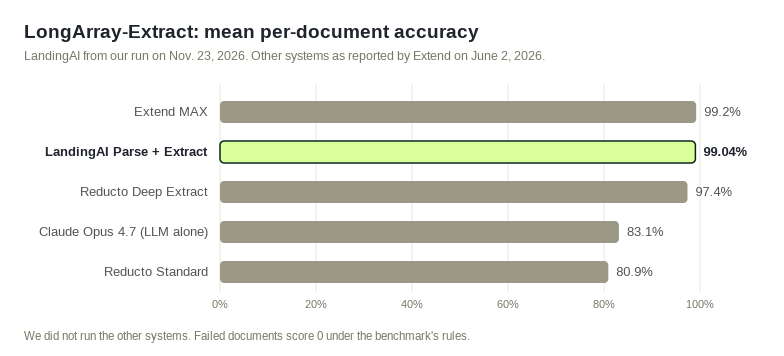
Extend reports scores for other systems on the same benchmark and metric. The values shown below were obtained Nov 24 from https://www.extend.ai/resources/long-array-extraction-benchmark.
As of this date, Extend MAX, Extend's own system, leads at 99.2%. LandingAI follows in a close second place at 99.04% ahead of every other system Extend reports.
Speed and accuracy
Extend also reports how long each system took. The chart below plots each system's mean per-document accuracy against its mean wall-clock time per document. We made it on November 24, 2026, from the values in the speed and accuracy chart on Extend's LongArray-Extract page with the LandingAI result from our run added.
It is important to note that we ran our test using the async Parse Jobs API and Extract Jobs API on the Standard tier. The async choice optimizes for price, not for speed. Queue time while waiting for the Jobs API is added to wall clock time. Faster performance is possible with the Priority tier.
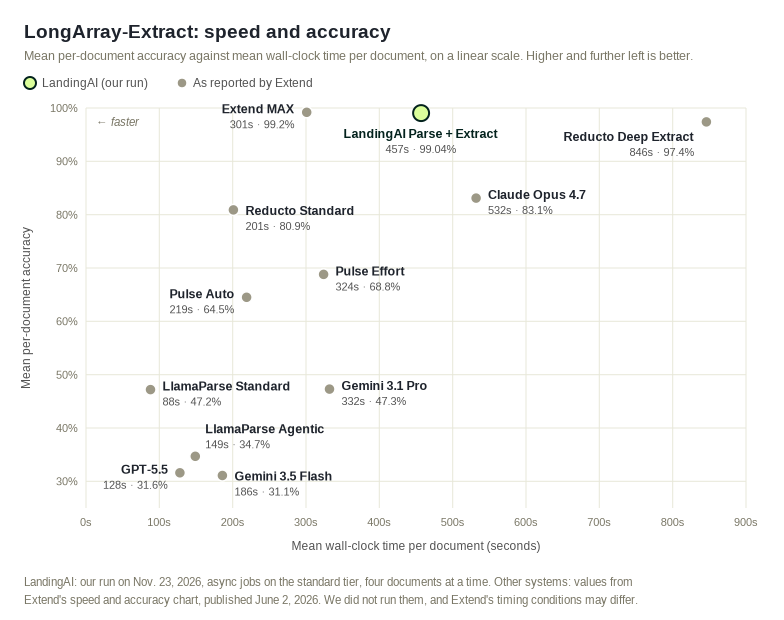
Treat the time comparison as approximate. Our figure is the time from submitting the parse job to receiving the extract result, using async jobs on the standard tier with four documents in flight at once, and it includes any time in the queue. Extend's page doesn't say how it timed each system.
Getting the row count right
Row count is the first thing to check on a long array, because every other measure depends on it. A dropped row loses all of its fields at once: 25 data points on a clinical report, 16 on a pleading. Extra rows don't lower the benchmark score, but in practice they are worse, because a duplicated transaction is a wrong number in someone's reconciliation.
The scatter plot below shows the row count for every document at once. Each point is one document. Its position across is the number of rows in the answer key, and its height is the number of rows we returned. A point on the dashed line returned exactly the right number.
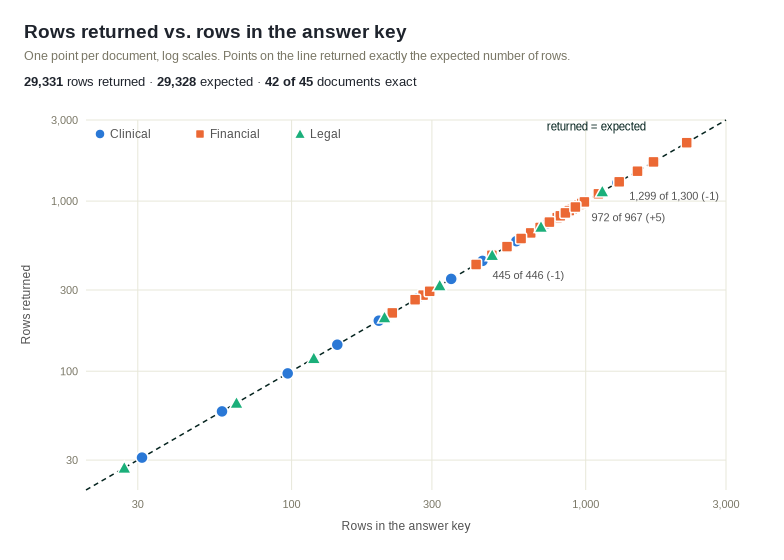
This view makes failures easy to spot. A system that loses rows at page breaks, or stops partway through a long document, puts points below the line, and the gap grows with document length. Duplicated rows push points above it. The log scales give a 27-row statement and a 2,205-row statement the same room, so a short document can't hide behind a long one.
All 45 points sit on or right beside the line. 42 of 45 documents returned exactly the expected number of rows. The other three were off by 1, 1 and 5 rows, on documents of 446 to 1,300 rows. No document lost a run of rows at a page break or stopped partway through.
Case in point: One document, 235 pages, 1,283 of 1,283 rows
The longest document in the benchmark is a 235-page adverse-event report for a clinical trial run by a fictional sponsor, Cairnvale Biomedica. It lists 1,283 adverse events. Parse + Extract returned all 1,283 and scored 99.20% across every field.
No single page holds a complete row. The event below, a high glucose reading on page 120, needs:
- the subject number and treatment group that open the subject's block of events at the bottom of page 119;
- the subject's age, sex and race from the demographics listing on page 21, nearly 100 pages earlier;
- the meaning of the severity, action and outcome codes, which a footnote legend defines.
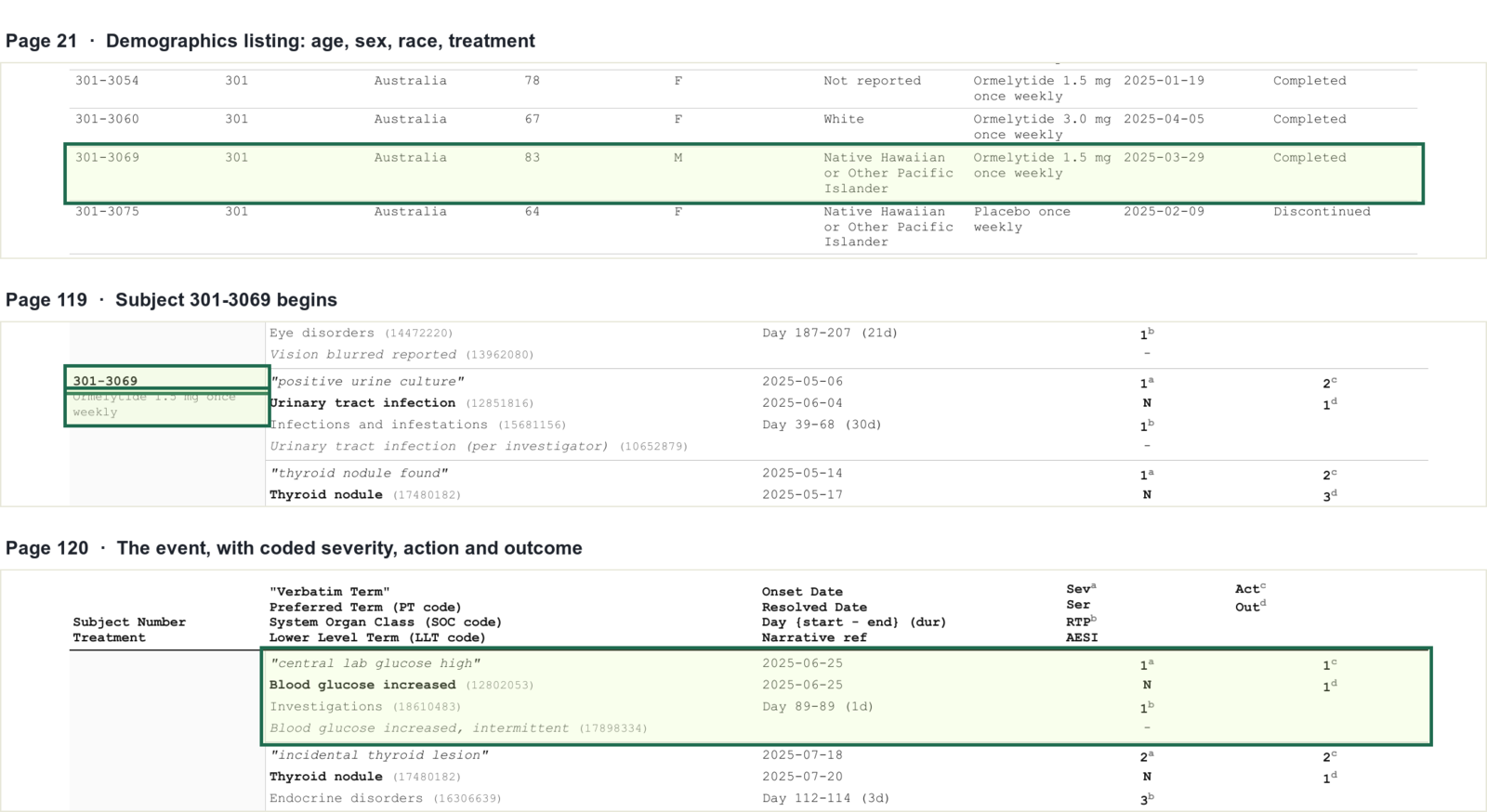
Here is the row Parse + Extract returned for that event, exactly as the API returned it. All 25 fields match the answer key:
{
  "action_taken": "NONE",
  "aesi_category": null,
  "age_years": 83.0,
  "duration_days": 1.0,
  "end_date": "2025-06-25",
  "lower_level_term": "Blood glucose increased, intermittent",
  "lower_level_term_code": "17898334",
  "narrative_reference": null,
  "outcome": "RECOVERED",
  "preferred_term": "Blood glucose increased",
  "preferred_term_code": "12802053",
  "race": "Native Hawaiian or Other Pacific Islander",
  "relationship_to_study_product": "NOT_RELATED",
  "relative_end_day": 89.0,
  "relative_start_day": 89.0,
  "serious": false,
  "severity": "MILD",
  "sex": "M",
  "site_id": "301",
  "start_date": "2025-06-25",
  "subject_id": "301-3069",
  "system_organ_class": "Investigations",
  "system_organ_class_code": "18610483",
  "treatment_group": "Ormelytide 1.5 mg once weekly",
  "verbatim_term": "central lab glucose high"
}
Where our misses came from
37 of the 45 documents scored above 99%. The misses cluster in a few documents, and most come from one repeated cause per document.
Four causes account for most of the misses. Each example below shows the page, the answer key's value and ours.

What happened
This adverse-event report prints every verbatim term in quotation marks. We kept them, and the answer key drops them. That accounts for 439 of the report's 440 verbatim-term misses. The report scored 95.43%.

What happened
The paragraph names Owen Jensen and Caleb Nolan as the defendants linked to this act, in that order, and the answer key follows it. We listed Caleb Nolan, who carried out the act, first. The names are the same, but the scorer compares lists in order, so the field counts as a miss. This happened 186 times across the legal pleadings. In another 531 cases, we named more defendants than the key does. Together, that one field is why legal was the weakest vertical, at 98.43%. Most of these misses are in this pleading, the largest, which scored 96.70%.

What happened
The statement lists check 2100 in a table of checks with a date and an amount, and no description. The schema still asks for one, so the answer key wrote "CHECK PAID 2100" and we wrote "CHECK 2100". Neither wording is on the page, and the fuzzy match on descriptions is too strict to accept both. The same thing happened on 136 checks across 17 statements, and none of those statements prints "CHECK PAID".

What happened
The statement prints the full account number, ending in 9933. Extract returned 3933 as the last four digits on all 700 rows. The parsed text had the right number, so the error came from the extraction step. One wrong digit, repeated on every row, took 17 points off this statement, which scored 83.2%. It was our biggest single loss.
The score with format differences counted. Three of these four causes are differences in format: quotation marks the page prints, check wording the page doesn't print, and the same names in a different order. The account digit is a real error. If the three format differences were scored as correct, 764 more data points would match and LandingAI's mean per-document accuracy would rise to 99.26%:
Why LLMs fail on long arrays
Extend also ran four frontier models on their own: Claude Opus 4.7, Gemini 3.1 Pro, GPT-5.5 and Gemini 3.5 Flash. Each document went straight to the model with a request for JSON, and no custom chunking or retry logic.
| System | Documents completed | Mean per-document accuracy | Mean wall-clock |
|---|---|---|---|
| Claude Opus 4.7, used alone | 45/45 | 83.1% | 532s |
| Gemini 3.1 Pro, used alone | 45/45 | 47.3% | 332s |
| GPT-5.5, used alone | 45/45 | 31.6% | 128s |
| Gemini 3.5 Flash, used alone | 45/45 | 31.1% | 186s |
| LandingAI Parse + Extract | 45/45 | 99.04% | 457s |
Every model returned a result for every document, so completion alone doesn't show the problem. The best of them, Claude Opus 4.7, scored 16 points behind Agentic Document Extraction, and the other three scored below 50%.
Extend's write-up explains why. The models understand the documents, and the early rows tend to be accurate. What fails is keeping every row as the output grows: rows near the end get left out, rows get sampled from the middle of the document, and the model can return well-formed JSON before it has captured every item. A document can fit in the model's context window and still fail, because the answer is too large to write reliably in one response.
At this scale the errors add up quickly. The 235-page clinical report has 32,075 data points. At 83% accuracy, that is about 5,400 wrong values, and at 31%, about 22,000.
Agentic Document Extraction splits the work in two. Parse reads every page into structured Markdown and tables, and Extract fills the schema from that output, so no single response has to hold the whole document.
How we ran it
We made one complete run on November 23, 2026:
- Models: Parse
dpt-3-pro-20261111and Extractextract-20261111, on the public production API, standard tier, with default settings. - Post-processing: none. The
extractionobject the API returned is the prediction. - Scorer: Extend's reference scorer, copied unchanged from the dataset README.
- Schemas: Extend's published schemas. Three keys that only Extend's engine reads were translated into our documented equivalents, and no field, type, allowed value or description was changed.
- Retries: a job that errored would have been resubmitted, up to three times, and a completed job is never re-run. None were needed.
| Extend-only key | What we did |
|---|---|
extend:type: "date" | Replaced with "format": "YYYY-MM-DD" |
extend:descriptions (one per allowed value) | Added to the field's description as "Allowed values: …" |
extend:type: "currency" | Removed; the amount object already defines the amount and currency code |
Everything is public: predictions, per-document scores, the run record, the code and a pinned download script. See the LongArray-Extract results in our benchmarks repository.
What this means for your documents
If your workflow depends on every row of a long list, these results apply directly:
- Transaction-level analysis of bank and brokerage statements
- Safety-report line listings in clinical and pharmacovigilance work
- Case filings with long schedules of charges or parties
- Invoices and bills of lading with many line items
The workflow is the one you would use yourself: Parse the document, then Extract with a JSON schema. If you don't have a schema yet, Build Schema drafts one from your documents.
Try it on your own documents, or reproduce these results from the public repository.
Fine print
- Comparison scores and times are as reported by Extend on June 2, 2026, and were last retrieved November 24, 2026.
- The documents are synthetic and published under CC BY 4.0 on Hugging Face.
- Mean per-document accuracy weights each document equally. Overall accuracy pools every data point, so long documents count for more.