
Every ADE call comes down to one question: is a person waiting on the result right now? That single fact should drive how you handle the request.
Picture two situations. In the first, someone has just uploaded a document in your app and is watching a loading indicator, waiting for the extracted fields to appear. In the second, a scheduled job runs overnight through ten thousand archived contracts while no one is watching; it makes no difference whether any single contract takes two seconds or two minutes, as long as the whole batch is done by morning.
Those two jobs want opposite things. The first needs low latency — the delay between sending a request and getting the response back — even if that costs more. The second can trade speed for a lower price, because nothing is waiting on it.
ADE lets you make that trade-off explicitly, one request at a time, through a setting called service_tier. Instead of building your whole system around the most time-sensitive case and overpaying for everything else, you tell ADE how urgent each call is.
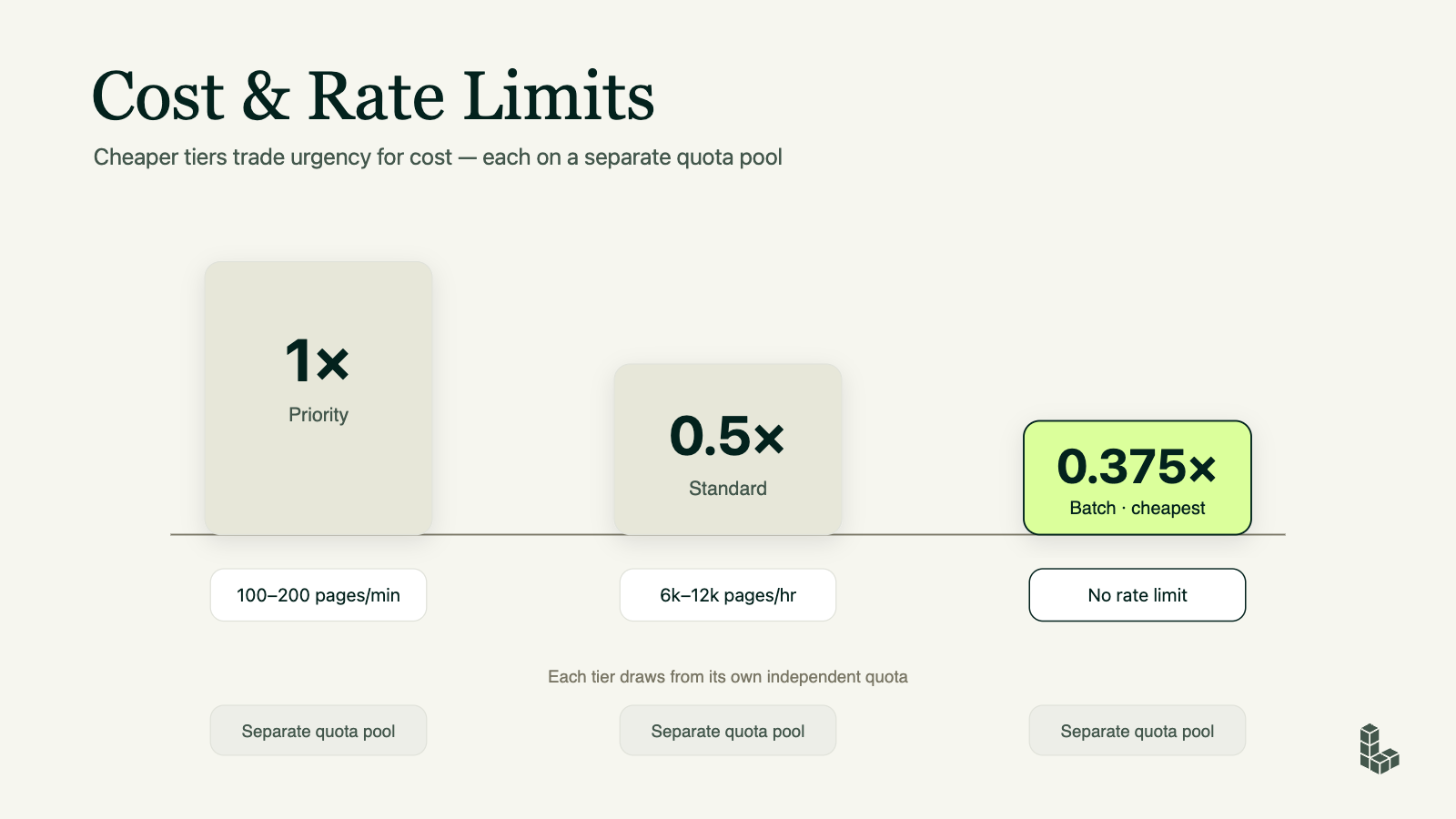
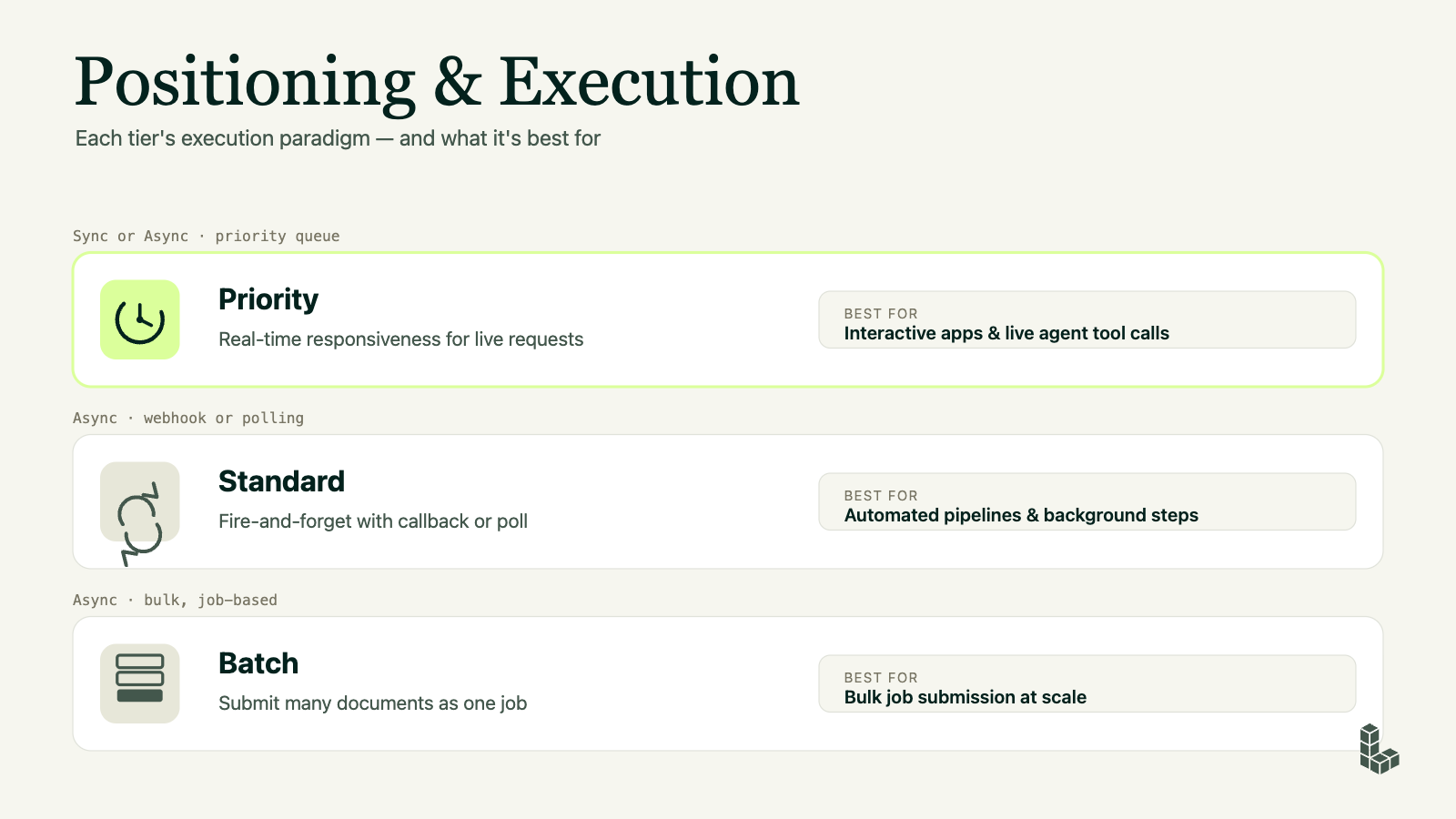
There are three tiers — Priority, Standard, and Batch. All three run the same models and return the same structured output, so the result itself never changes. What changes is how fast you get it back, how much it costs, and how the request behaves when ADE is under heavy load — whether it moves toward the front of the line or waits its turn. The rest of this post walks through each tier so you can pick the right one the first time.
One decision: is a human or agent stuck waiting on this call?
The tiers are not a quality setting. Priority does not parse a document any better than Batch — the model, the accuracy, and the output are identical across all three. What you're choosing is scheduling: how urgently this particular request gets handled.
Think of service tiers like package delivery. Overnight express, ground, and freight all deliver the exact same box in the exact same condition. You aren't paying for a better box; you are paying for how quickly it needs to arrive. Pick express for what someone needs tomorrow, and freight for the pallet that just has to show up sometime next week.
So the only question that sets the tier is: who, if anyone, is waiting on this result before they can move on?
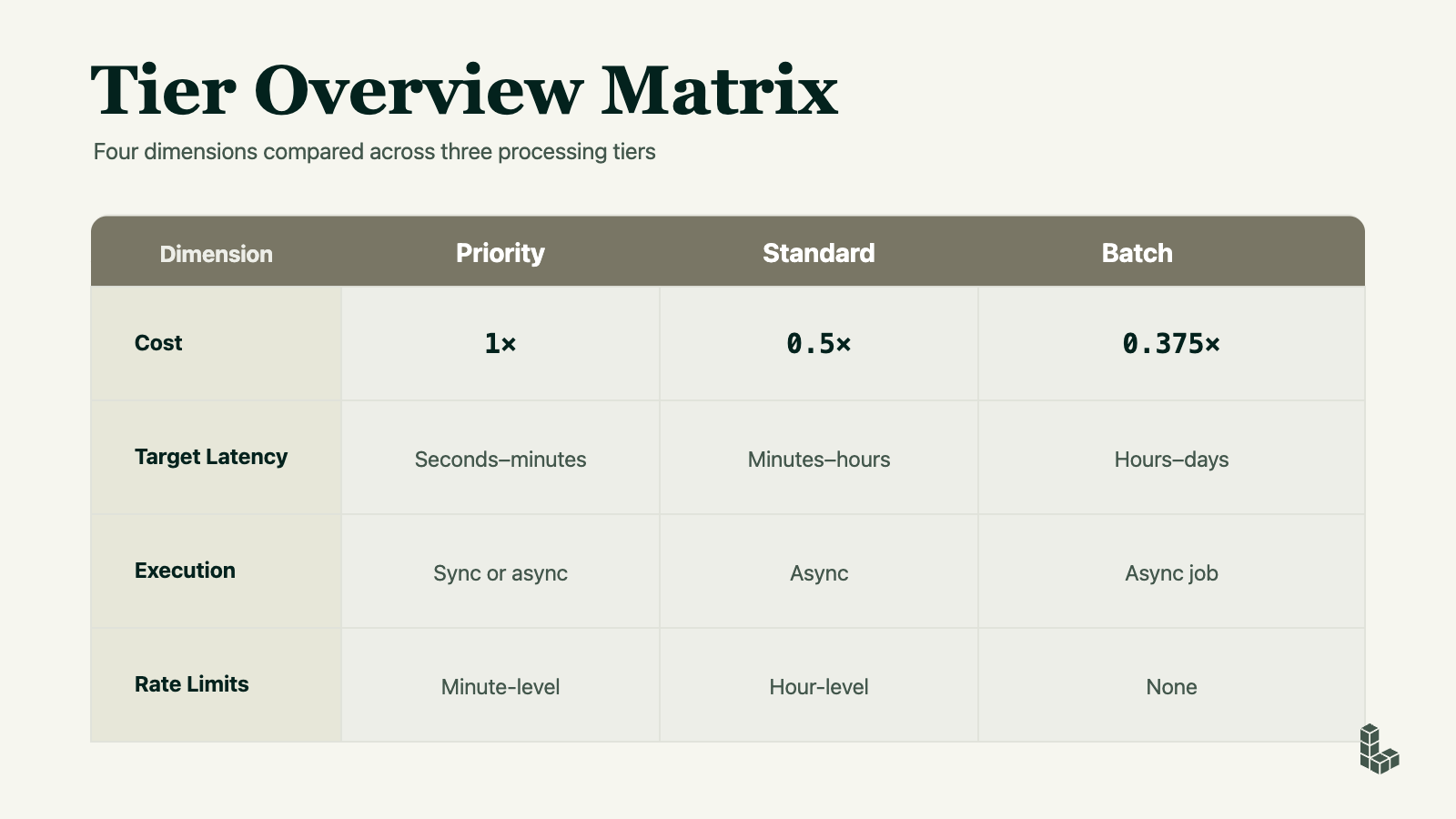
- A person is watching a loading indicator in your app → Priority (seconds to minutes).
- An agent is mid-conversation and can't form its reply until this result comes back → Priority. In software terms the agent is blocked — stopped, unable to continue until the call returns.
- An agent is doing background work with no live user attached → Standard (minutes to hours, half the cost).
- You're populating a knowledge base, running evaluations, or ingesting a large collection of documents → Batch (hours to days, no rate limits).
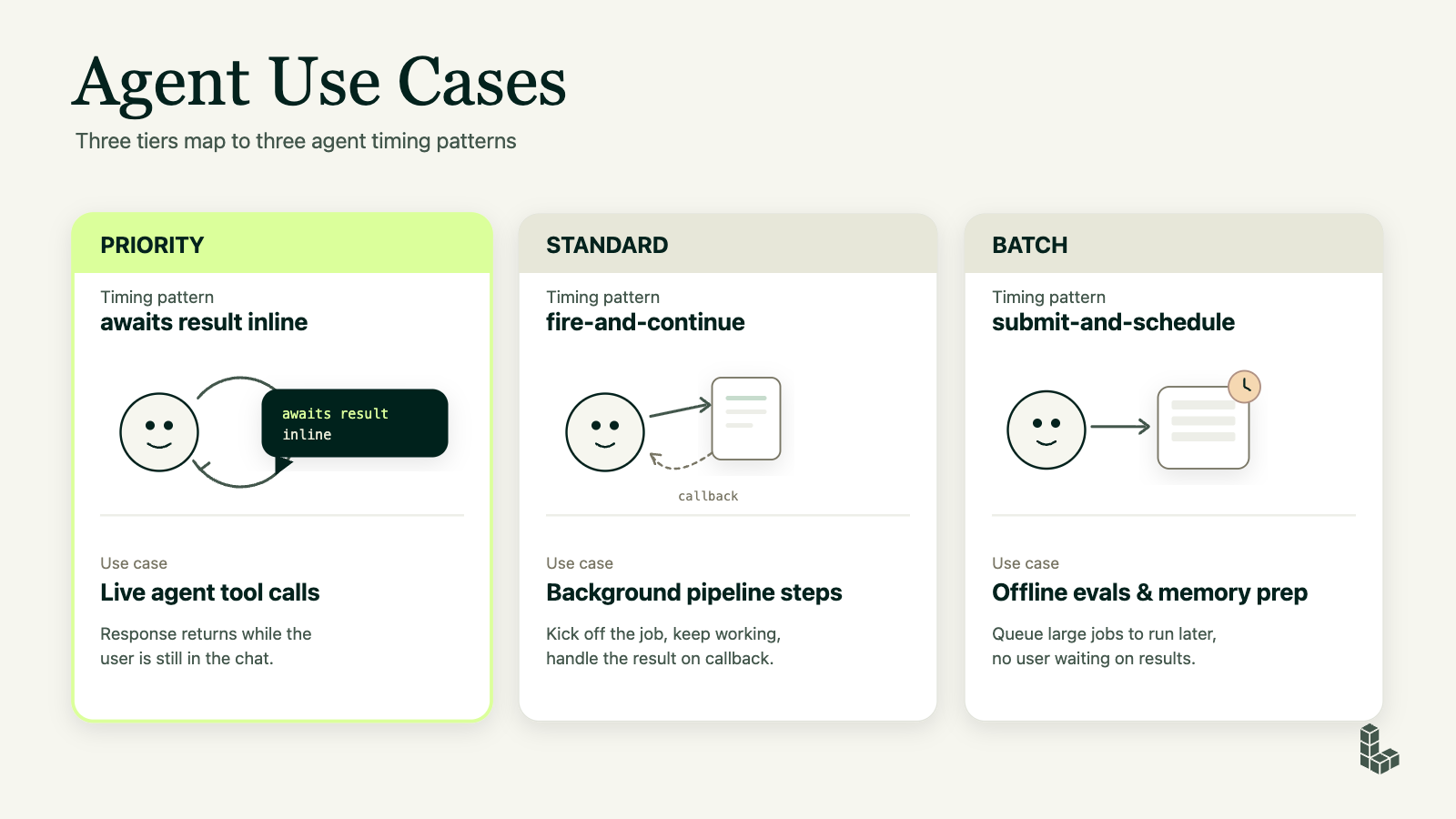
Cost follows urgency: Priority is the 1× baseline, Standard is 0.5× (half price), and Batch is 0.375× (just over a third). Since the output is byte-for-byte the same, defaulting everything to Priority when nothing is actually waiting means paying premium rates for speed no one benefits from.
The sync Priority path
Reach for Priority when the result sits on the critical path of a live interaction — meaning the interaction literally cannot proceed until the result arrives. That's an interactive app where a person is waiting, or an agent tool call the model needs answered before it can continue its turn.
Synchronous execution is supported exclusively on the Priority tier — you cannot make a synchronous call using Standard or Batch. Synchronous (or "sync") simply means your application sends the document and holds the network connection open while it waits for the extraction result to return on that exact same request. It is a direct "one call, one immediate answer" model: you don't receive a job ID, and there is no need to write extra code to poll an endpoint or set up webhooks to check back later. Because it requires the simplest setup, sync is the natural fit for live, interactive features where a human or agent is actively waiting on the line.
That convenience comes with two hard limits on the synchronous path: an 8-minute timeout (if parsing runs longer, the request gives up) and a cap of 100 pages per request. Imagine a support agent parsing a customer-uploaded receipt mid-chat — small document, answer needed instantly, well within both limits.
The async Priority path
There's also an asynchronous Priority path — you submit the work as a job with service_tier="priority" and retrieve the result a moment later instead of holding the connection open. Crucially, this path does not carry the 8-minute timeout or the 100-page cap.
Asynchronous means you don't wait on the open request. You get back a job ID immediately, then either poll it — check back every so often to ask "done yet?" — or, once webhooks ship, receive a callback, where the service pings you the moment it finishes so you never have to keep asking.
This matters when your agent needs fast turnaround on a large document — say a 400-page filing that would blow past both synchronous limits, but that also can't sit in a slow Standard queue for hours because the agent is mid-workflow. You submit the job and pick up the result shortly after.
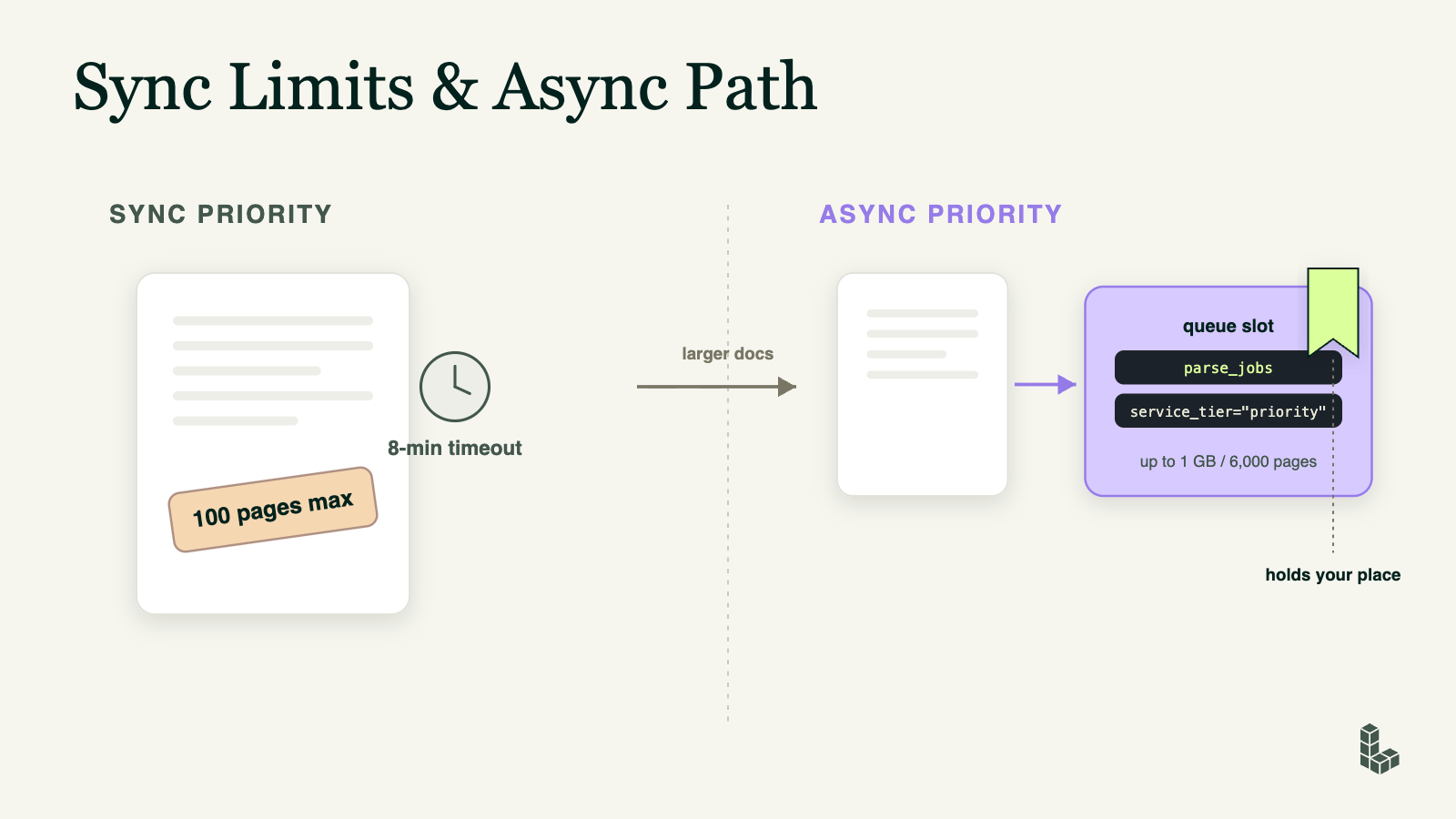
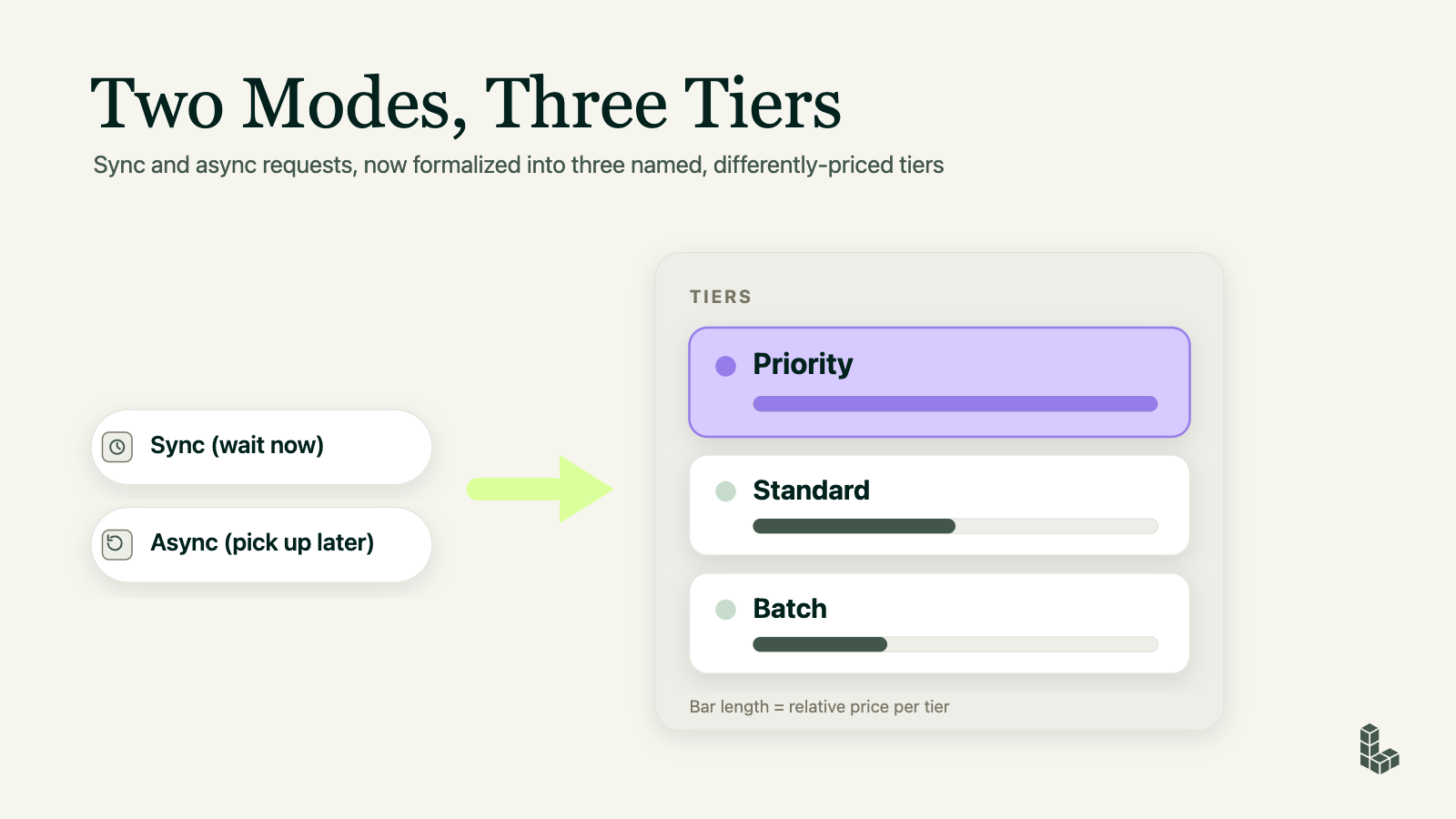
The pattern here is fire-and-continue: the agent queues the job, moves on, and grabs the result on its next loop — Priority speed without the page ceiling of the synchronous path.
Standard and Batch: built for pipelines
Standard is the default for automated pipelines and background agent steps — anything with no live user waiting. It's asynchronous only, runs at hour-level rate limits (roughly 6,000–12,000 pages per hour), and costs half what Priority does. Same fire-and-continue pattern: queue the job, pick up the result by polling (webhooks are on the roadmap). A typical use is an incremental index update — new documents trickle in, get parsed and chunked, and land in your retrieval store on a rolling basis.
Batch is the bulk tier for work measured in hours to days: the initial ingestion of an entire corpus, full knowledge-graph population, large-scale embedding prep, and offline agent evaluations. It has no rate limit and an isolated quota pool, so a massive ingestion run can't starve your live interactive traffic. Its pattern is submit-and-schedule — one process submits all the jobs, and a separate process collects the results later, often on a schedule.
Switching tiers is one parameter
The most common misconception is that changing tiers means rearchitecting your system. Moving a job from Priority to Standard to cut the cost in half is just swapping the value of service_tier:
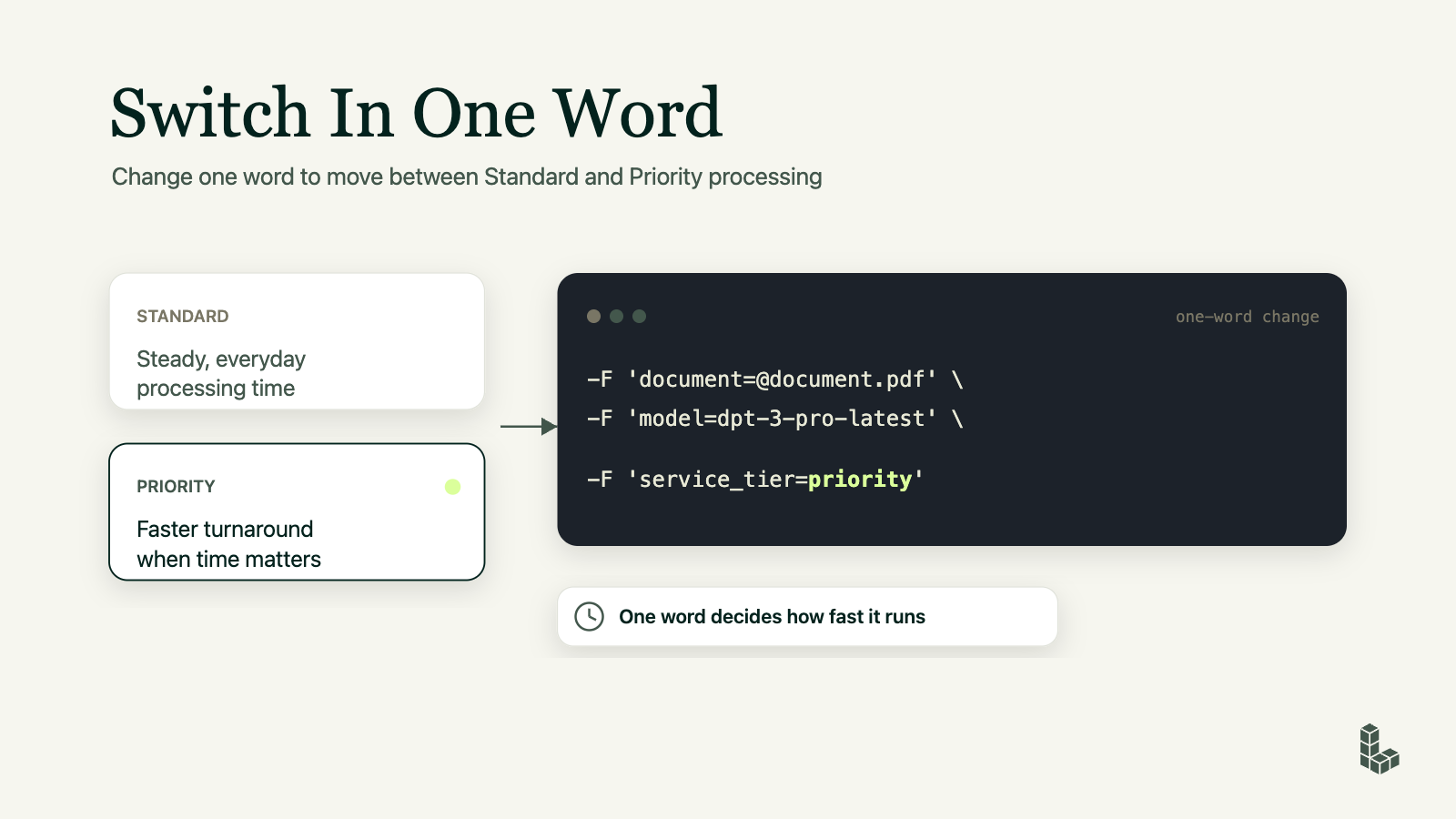
And because the multipliers are fixed (1× / 0.5× / 0.375×), estimating cost is straightforward arithmetic: pages × model rate × tier multiplier. Right-sizing a Batch job is a calculation, not a redesign. Write your parsing code once against the job API, and the tier becomes a dial you turn at runtime based on who's waiting.
Putting it together: retrieval and knowledge pipelines
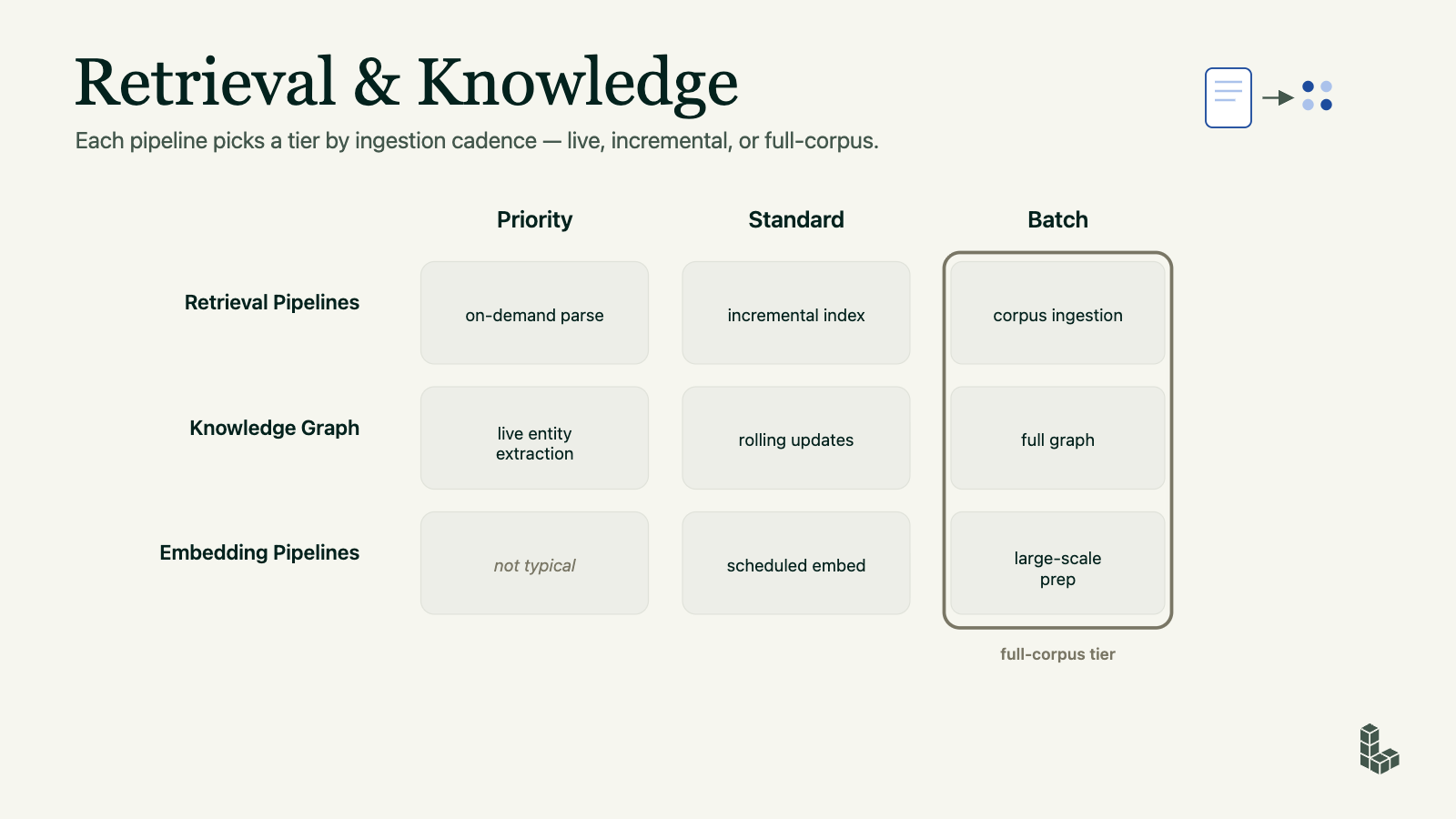
The same "who's waiting?" logic maps cleanly onto the pipelines most teams build on ADE, and the right tier usually comes down to how often documents arrive. Take a retrieval pipeline: parsing a document the moment a user drops it in — an on-demand parse someone is waiting on — is Priority work, but keeping an existing index fresh as new documents trickle in is an incremental job that fits Standard, and standing up the index for the first time by ingesting an entire corpus belongs on Batch.
Knowledge-graph work follows the same shape: pulling entities out of a document live during an interaction is Priority, applying rolling updates to the graph as data changes is Standard, and building the full graph from scratch is a Batch run.
Embedding pipelines skew toward the back of that spectrum — there's rarely a live user blocked on an embedding, so it's not typical Priority work; scheduled embedding jobs sit on Standard, and large-scale embedding prep across a whole collection is classic Batch. The pattern to notice is that Batch is the natural home for anything full-corpus — the one-time, everything-at-once runs where nobody is waiting and the lowest rate wins.
Questions about ADE pricing
If you have questions about pricing, a specific formula, or how to read your bill, email support@landing.ai.
Plan for Batch when you're ingesting at scale and can trade turnaround for the lowest rate.
Price tracks two things — how much content is on the page and how fast you asked for it — and both are reported in every response, which makes your whole document mix cheap to automate and easy to forecast.
Read the docs · Start building
Service tiers apply to the DPT-3 model line. Batch and async support for Split, Build Schema, Section, and Classify are rolling out over the coming months.